Which AI video generator is right for you? It depends on your goals. OpenAI‘s Sora 2 is perfect for creators, influencers, and small businesses needing quick, visually engaging videos with features like physics-based motion and personalized "Cameo" integration. Meanwhile, Google’s VEO 3.1 excels in professional-grade visuals, precise editing, and cinematic quality, making it ideal for filmmakers, developers, and marketing teams.
Here’s what you need to know:
- Sora 2 Highlights:
- Best for social media, storytelling, and personalized content.
- Faster video generation (12 seconds in ~30 seconds).
- Features like physics simulation and "Cameo" for likeness integration.
- Softer, filmic visuals suited for narrative-driven content.
- VEO 3.1 Highlights:
- Best for product showcases, commercials, and professional campaigns.
- Precise control over lighting, textures, and camera movements.
- Advanced "Flow" editor and up to 3 reference images for brand consistency.
- Photorealistic visuals and extended video durations (up to 148 seconds).
Quick Comparison
| Feature | Sora 2 | VEO 3.1 |
|---|---|---|
| Target Audience | Creators, influencers, small teams | Professionals, developers, filmmakers |
| Editing Style | AI-driven, cinematic | Precise, frame-level control |
| Max Video Length | 15–25 sec (up to 60 sec extended) | 8 sec (up to 148 sec extended) |
| Visual Style | Filmic, stylized | Photorealistic, detailed |
| Generation Speed | 12 sec video in ~30 sec | 8 sec video in ~45 sec |
| Best Use Cases | Social media, storytelling | E-commerce, commercials |
| Pricing | Lower cost | $0.40 per second |
For quick, creative projects, Sora 2 is your go-to. For polished, professional productions, VEO 3.1 takes the lead. Dive into the full comparison to find the right fit for your workflow.
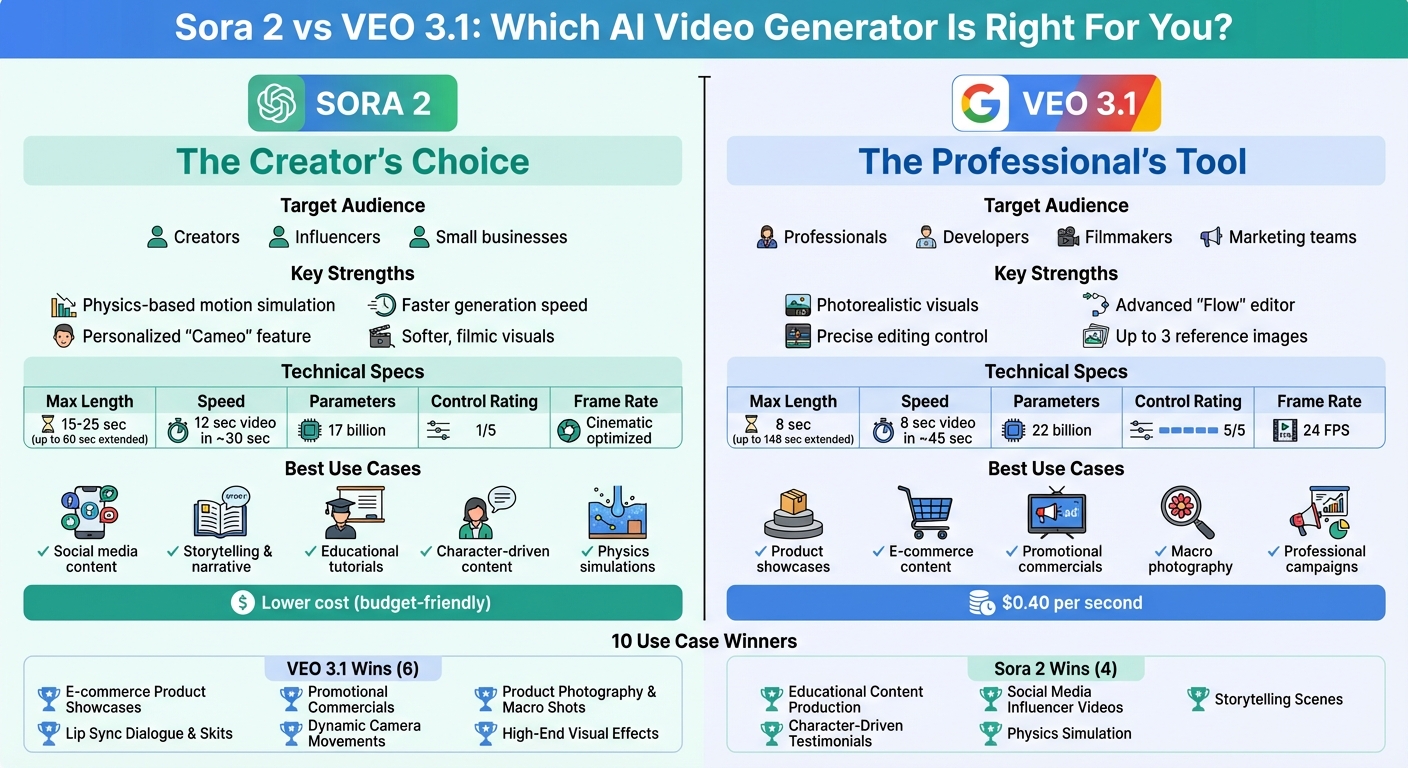
Sora 2 vs VEO 3.1 AI Video Generator Comparison Chart
Technical Specifications Comparison
Core Features and Capabilities
Sora 2 simplifies creative workflows with features like Cameo, which allows direct likeness insertion, and multi-shot editing that automatically sequences varied camera angles for dynamic storytelling.
On the other hand, Veo 3.1 prioritizes precision and control. Its Flow editor enables object insertion or removal while automatically matching lighting and shadows. Veo 3.1 also supports three reference images through its "Ingredients to Video" feature, ensuring consistent character and style. Additionally, its "Frames to Video" function creates smooth transitions between starting and ending frames.
"Sora 2 is the first AI tool that actively punishes you for trying. It’s like it knows when you’re overthinking and just… decides to mess with you." – Will, Author, Selfgen.co
| Feature | Sora 2 | Veo 3.1 |
|---|---|---|
| Max Native Length | 15–25 seconds (up to 60 seconds extended) | 8 seconds (extendable to 148 seconds) |
| Reference Control | General image-to-video | Up to 3 reference images |
| Editing Style | AI-driven sequencing | Surgical frame-level edits |
| Personalization | Cameo (likeness insertion) | None |
| Control Rating | 1/5 | 5/5 |
These features highlight clear differences in editing approaches and personalization, catering to distinct creative needs.
Performance and Efficiency Metrics
When it comes to performance, the tools show notable contrasts. Sora 2 generates a 12-second video in just 30 seconds, reflecting a 40% speed boost compared to its earlier version. Meanwhile, Veo 3.1 takes 45 seconds to produce an 8-second clip. Veo 3.1 operates at 24 FPS, while Sora 2 employs a frame rate optimized for cinematic storytelling.
In terms of visual output, Veo 3.1 excels with high-detail visuals, precise lighting, and specular control, making it perfect for product-focused content. Sora 2, however, leans into a softer, filmic style that works beautifully for narrative-driven or stylized creations, such as anime. For physics simulation, Sora 2 emphasizes natural object interactions, like a basketball rebounding realistically. That said, Veo 3.1 demonstrates stronger performance in handling complex environmental physics during testing.
From a technical standpoint, Veo 3.1 relies on a spatiotemporal transformer with 22 billion parameters and achieved an 87% satisfaction rate in production tests for narrative content. In contrast, Sora 2 uses a unified transformer with 17 billion parameters applied to spacetime patches. Audio quality also sets the two apart – Sora 2’s voiceovers can sound flat or monotone, while Veo 3.1 delivers richer, more polished dialogue.
10 Use Case Tests
Use Case 1: E-commerce Product Showcases
When it comes to showcasing products online, Veo 3.1 sets the bar high with its ability to create polished, studio-quality hero shots. It excels in rendering intricate details like glass, liquid, and metal textures, capturing elements such as steam or glitter with impressive precision. Its standout feature, Ingredients to Video, allows users to upload up to three reference images, ensuring consistent visuals across an entire product catalog.
Meanwhile, Sora 2 offers a softer, more cinematic approach. This makes it a great fit for creating social-style ads with integrated voiceovers. Although it doesn’t quite match Veo 3.1’s precision in lighting and texture rendering, it’s faster at generating multiple variations during the brainstorming phase.
| Criteria | Sora 2 | Veo 3.1 |
|---|---|---|
| Lighting Control | Cinematic | Studio-grade |
| Material Rendering | Softer textures | Realistic glass, metal, liquid |
| Reference Consistency | Basic image-to-video | Up to 3 reference images |
| Best For | Social ads with voiceovers | High-end product photography |
| Speed | ~30 seconds for a 12-second clip | ~45 seconds for an 8-second clip |
From product showcases, the focus shifts to how these tools perform in educational content creation.
Use Case 2: Educational Content Production
Building on its strengths in social content, Sora 2 transitions seamlessly into creating narrated tutorials and explainers. It syncs voiceovers perfectly with scene transitions and handles multi-step prompts effectively. Additionally, it supports multilingual narration, such as Chinese voiceovers paired with synchronized captions.
Veo 3.1, on the other hand, delivers unmatched consistency in visual quality, making it ideal for technical diagrams and step-by-step demonstrations. It ensures accuracy and clarity across complex educational series.
"Veo 3.1 edges ahead for photoreal ‘commercial’ looks and edit control; Sora 2 remains better for narration and stylized storytelling." – Hannah, Reviewer, GoEnhance
| Criteria | Sora 2 | Veo 3.1 |
|---|---|---|
| Voiceover Integration | Seamless sync | Reliable audio |
| Multi-step Instructions | Clear progression | Consistent execution |
| Caption Sync | On-beat timing | Standard sync |
| Multilingual Support | Proven with Chinese narration | Standard support |
| Best For | Narrated tutorials and explainers | Technical courses and corporate training |
Use Case 3: Social Media Influencer Videos
In the world of social media, Sora 2 shines with its Cameo feature, enabling creators to insert their own likeness and voice into scenes effortlessly. Designed for personal branding and viral content, it emphasizes creativity and community-driven remixing.
Veo 3.1 also caters to social media needs, supporting vertical 9:16 video at 1080p – perfect for platforms like TikTok and YouTube Shorts. It integrates with tools like Google Workspace but lacks some of the viral-focused features that make Sora 2 so appealing for influencers.
| Criteria | Sora 2 | Veo 3.1 |
|---|---|---|
| Personalization | Cameo feature for likeness insertion | None |
| Vertical Format | Supported | 9:16 at 1080p |
| Platform Integration | iOS app | YouTube Shorts and Google Workspace |
| Remixing Tools | Community-driven features | Limited |
| Generation Speed | ~10 seconds per clip | Standard speed |
| Best For | Personal branding and viral content | Professional social campaigns |
From social media, the spotlight moves to high-budget promotional campaigns.
Use Case 4: Promotional Commercials
For high-budget commercials requiring strict adherence to brand guidelines, Veo 3.1 is the go-to tool. Its Flow editor provides precise control over object insertion or removal, automatically matching lighting and shadows. It also supports extended clip durations of up to 148 seconds.
Sora 2 is better suited for the initial creative process, quickly generating multiple concept drafts. Many agencies use Sora 2 for brainstorming before transitioning to Veo 3.1 for polished, brand-accurate final executions.
| Criteria | Sora 2 | Veo 3.1 |
|---|---|---|
| Visual Polish | Cinematic, stylized | Photorealistic, advertising-grade |
| Editing Control | Iteration-based | Precise insert/remove tools |
| Brand Consistency | Moderate | High with reference support |
| Max Duration | Short clips with extended options | Extendable up to 148 seconds |
| Best For | Concept development and stylized ads | Final execution and brand campaigns |
Use Case 5: Storytelling Scenes
For narrative-driven content, Sora 2 excels by maintaining consistent character identity and silhouettes across scenes. It’s particularly effective for stylistic formats like anime, offering smooth, cinematic motion and expressive interactions that bring stories to life.
Veo 3.1 is better suited for realistic environments, though it may occasionally struggle with character consistency in longer sequences. This makes it ideal for projects emphasizing detailed settings over character-driven narratives.
"Sora 2 is an artist’s tool – expressive, cinematic, and social… Veo 3, by contrast, is a publisher’s tool – efficient, consistent, and deeply embedded in distribution platforms." – Vyom Ramani, Journalist, Digit.in
| Criteria | Sora 2 | Veo 3.1 |
|---|---|---|
| Character Consistency | High in stylized content | Moderate with occasional drift |
| Narrative Flow | Smooth progression | Environmental detail focus |
| Motion Quality | Natural and expressive | Realistic physics |
| Stylization | Anime and artistic styles | Photorealism |
| Best For | Character-driven stories and anime | Realistic environmental narratives |
Use Case 6: Product Photography and Macro Shots
When it comes to macro photography, Veo 3.1 leads the way. Its ability to capture micro-details like refraction, textures, and highlights makes it perfect for professional, close-up product shots. Advanced lighting control ensures every detail is rendered with precision.
Sora 2 delivers a pleasing aesthetic but falls short in technical sharpness. It’s better suited for product videos that emphasize storytelling and motion rather than extreme close-up detail.
| Criteria | Sora 2 | Veo 3.1 |
|---|---|---|
| Micro-Detail Rendering | Aesthetically pleasing | Sharp and detailed |
| Texture Accuracy | Moderate | Precise material rendering |
| Lighting Control | Standard | Advanced specular control |
| Best For | Product stories and lifestyle content | Technical photography (jewelry, cosmetics) |
Use Case 7: Character-Driven Testimonials
For testimonials, Sora 2 offers clear voiceovers and allows creators to use its Cameo feature to personalize content with their own likeness.
Veo 3.1, on the other hand, delivers professional-grade testimonials with rich dialogue and refined ambient sound. Its precise lip-syncing ensures a polished final product.
| Criteria | Sora 2 | Veo 3.1 |
|---|---|---|
| Voiceover Quality | Clear narration | Rich, natural dialogue |
| Lip Sync | Suited for social and direct content | Precise, natural synchronization |
| Best For | Authentic, personalized testimonials | Polished, professional presentations |
Veo 3.1 vs Sora 2: The Ultimate AI Video Showdown
sbb-itb-0df1f49
Complete Comparison Table
Testing across 10 use cases highlights where each tool shines. The table below provides a detailed breakdown, showing how VEO 3.1 and Sora 2 perform across various scenarios. Scoring is based on a 1–5 scale for realism, audio quality, editability, and format.
VEO 3.1 stands out in professional-grade visuals and photorealistic production, while Sora 2 leads in physics-based motion, storytelling, and personalized content for social platforms.
| Use Case | Sora 2 Performance | VEO 3.1 Performance | Winner |
|---|---|---|---|
| E-commerce Product Showcases | Delivers a softer, filmic aesthetic | Excels in micro-detail rendering and studio-quality lighting | VEO 3.1 |
| Educational Content Production | Integrates voiceovers seamlessly for engaging lessons | Offers consistent visuals for structured explainer videos | Sora 2 |
| Social Media Influencer Videos | Features Cameo likeness insertion and community remix tools | Supports 9:16 formats in 1080p but lacks viral-specific features | Sora 2 |
| Promotional Commercials | Creates cinematic drafts but offers less brand control | Produces advertising-quality visuals with precise editing capabilities | VEO 3.1 |
| Storytelling Scenes | Maintains strong narrative flow and character identity | Provides high cinematic quality but may experience minor character drift | Sora 2 |
| Product Photography and Macro Shots | Aesthetically pleasing but with softer texture details | Handles refraction, glitter, and specular effects convincingly | VEO 3.1 |
| Character-Driven Testimonials | Offers personalized Cameo likeness and clear narration | Delivers natural lip-syncing but lacks tools for personalized likeness | Sora 2 |
| Physics Simulation and Impact Effects | Excels in realistic interactions like rebounds and landings | Struggles with complex physical dynamics | Sora 2 |
| Lip Sync Dialogue and Skits | Functional but can sound flat or robotic | Produces lively, production-ready dialogue | VEO 3.1 |
| Dynamic Camera Movements and Transitions | Creates smooth, creative motion with a "steady cam" feel | Offers precise control through Frames to Video and API integration | VEO 3.1 |
Which Tool to Choose for Each Use Case
When it comes to achieving high-end visuals and advertising-grade realism, VEO 3.1 stands out as the top choice. It’s perfect for projects like product commercials or e-commerce showcases, where micro-detail and precise lighting are essential. The tool’s reference image feature ensures brand consistency across campaigns, while the Flow editor allows for fine-tuned adjustments, such as removing objects or tweaking lighting, without needing to regenerate the entire video clip.
On the other hand, Sora 2 shines in narrative-driven content and social media campaigns. Its advanced physics simulation handles complex interactions seamlessly. Plus, the "Cameo" feature lets influencers incorporate their own likeness into videos, creating a personalized and relatable touch.
"Choose Google Veo 3.1 if you are a developer, enterprise, or filmmaker who needs granular API control… Choose OpenAI Sora 2 if you are a creator, artist, or social media user." – Fenix, Crepal.ai
Speed and cost are also key factors to consider. Sora 2 is faster, generating a 12-second video in about 30 seconds, compared to VEO 3.1, which takes 45 seconds for an 8-second clip. Pricing reflects the difference in focus: VEO 3.1 costs $0.40 per second but delivers professional-grade results. For educational content with synchronized voiceovers, Sora 2 offers smoother integration. Meanwhile, VEO 3.1 is ideal for promotional commercials that require precise brand alignment and flexible aspect ratios.
Before committing to either platform, it’s a good idea to run pilot tests using your specific brand assets. Each tool has its limitations – VEO 3.1 may face challenges with intricate physics, while Sora 2 can experience slight character drift in longer sequences. These nuances highlight the strengths and best use cases for both tools, helping you make an informed decision based on your project’s needs.
FAQs
How do Sora 2 and VEO 3.1 compare in video generation speed and quality?
Sora 2 stands out for its speed, generating videos about 40% faster than VEO 3.1. This makes it a go-to option for tasks that demand quick turnarounds, like marketing campaigns or rapid prototyping, where every second counts.
VEO 3.1, however, shines in delivering top-tier video quality. With its advanced camera controls and seamless motion, it produces cinema-grade visuals that are perfect for storytelling or projects requiring a polished, professional touch. Though its rendering process takes more time, users often commend the exceptional results it achieves.
To sum it up: Sora 2 is your pick for speed and efficiency, while VEO 3.1 is the choice for breathtaking, high-quality visuals.
Which AI video generator offers the best value for creating social media content?
For creators churning out a large number of short-form social media videos, VEO 3.1 tends to be the more budget-friendly option. Sora 2 Pro, on the other hand, requires a $200 monthly subscription to ChatGPT Pro for full functionality. While there are alternative ways to access it, these often come with added steps and potential restrictions on usage.
Meanwhile, VEO 3.1 comes at a lower price, making it a cost-effective choice for creators working on fast-paced, high-volume projects. Its pricing is designed for those who want to deliver more content without stretching their budget.
How do Sora 2 and VEO 3.1 meet the needs of different users and video projects?
Sora 2 is built for creators who want a fast, straightforward way to craft short, cinematic videos. With features like text-to-video generation, lifelike visuals, and perfectly synced audio, it’s an excellent tool for solo creators or small teams working on social media posts, ad concepts, or storyboards. Its intuitive interface feels as easy to use as a social app, helping users achieve polished results quickly.
Meanwhile, VEO 3.1 is designed with larger teams and enterprise-level projects in mind. It provides detailed control over video settings and integrates seamlessly with tools that ensure brand consistency, streamline collaboration, and manage assets. This makes it ideal for producing e-commerce videos, educational materials, or corporate content, especially when scalability and smooth workflows are priorities.
To sum it up, go for Sora 2 if speed and ease are your top priorities, and opt for VEO 3.1 when precision and teamwork are essential for larger, more demanding projects.