Short prompts work better for AI video creation. Instead of overwhelming the AI with excessive details, concise and focused instructions lead to sharper, more consistent results. Here’s why:
- Simplicity improves clarity: AI models process prompts more effectively when they’re clear and to the point.
- Focus on essentials: Key elements like the subject, action, and style guide the AI without confusion.
- Better results, faster: Minimal prompts allow for quicker iterations and reduce the need for post-production fixes.
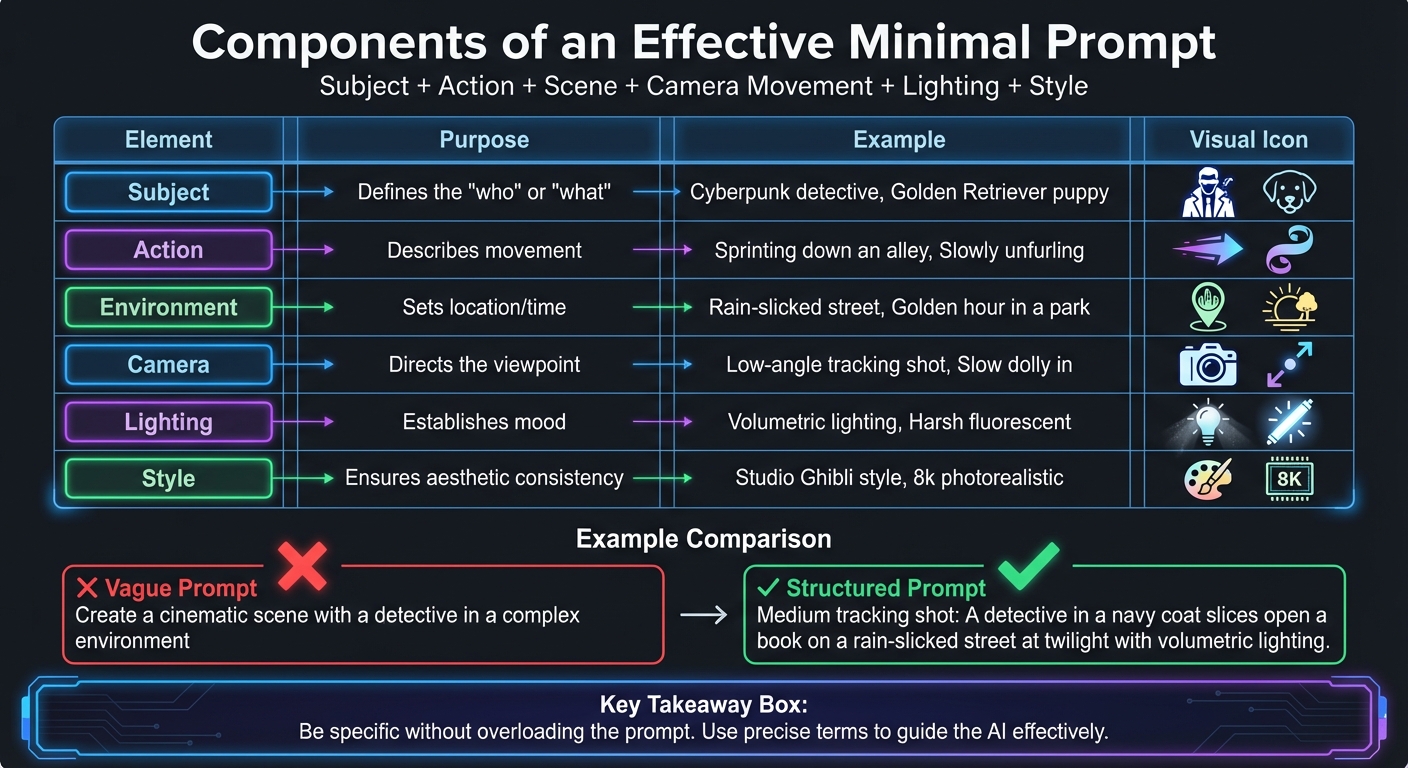
For example, instead of writing, “Create a cinematic scene with a detective in a complex environment,” use:
"Medium tracking shot: A detective in a navy coat slices open a book on a rain-slicked street at twilight with volumetric lighting."
This approach ensures efficiency, saves time, and delivers polished outputs. Whether you’re making social media clips, commercials, or explainer videos, keeping prompts simple is the key to success.
The ONLY 7 Prompts You Need to Create Any AI Video
Core Principles of Minimal AI Video Prompts
AI Video Prompt Components: Structured Formula for Better Results
How AI Processes Video Prompts
AI video tools operate differently from how humans think. Instead of reasoning or interpreting explicit commands, they process text prompts by breaking them down into layers of instructions and generating visuals accordingly. For these tools, a prompt acts more like a caption than a conversation. Phrasing such as "I envision a scene where…" or "please create…" adds unnecessary complexity, which can confuse the model.
In prompts, words at the beginning hold more weight than those at the end. If critical details are buried in the middle or tacked on at the end, the AI might miss them entirely. Additionally, overly detailed or conflicting instructions – like "A then B then C" – can result in chaotic outputs. These models are designed to work best with concise, focused prompts.
As Amazon Nova Reel explains: "Video generation models do not have the ability to reason or interpret explicit commands". Using abstract phrases like "the essence of joy" forces the AI to guess, often leading to erratic or irrelevant results. A better approach is to replace abstract ideas with specific physical actions. For instance, instead of saying "a welcoming manner", describe it as "smiles and waves".
This foundational understanding is essential for creating prompts with a clear and effective structure.
Components of an Effective Minimal Prompt
An effective minimal prompt follows a structured hierarchy: Subject + Action + Scene + Camera Movement + Lighting + Style. Each component plays a specific role in guiding the AI’s output.
| Element | Purpose | Example |
|---|---|---|
| Subject | Defines the "who" or "what" | Cyberpunk detective, Golden Retriever puppy |
| Action | Describes movement | Sprinting down an alley, Slowly unfurling |
| Environment | Sets location/time | Rain-slicked street, Golden hour in a park |
| Camera | Directs the viewpoint | Low-angle tracking shot, Slow dolly in |
| Lighting | Establishes mood | Volumetric lighting, Harsh fluorescent |
| Style | Ensures aesthetic consistency | Studio Ghibli style, 8k photorealistic |
The trick is to be specific without overloading the prompt. For example, describing a subject as "a seasoned detective in a navy coat", paired with a single action like "carefully slicing open a book spine", and an environment like "a rain-slicked street in perpetual twilight" creates a clear and focused visual. Avoid using vague adjectives or overly broad descriptions; instead, rely on precise terms like "medium tracking shot" or "bokeh" to guide the model effectively.
This structured approach ensures clarity and efficiency, which are particularly valuable in PyxelJam workflows.
Benefits of Simple Prompts in PyxelJam Workflows
Following these principles allows users to achieve consistently better results in PyxelJam. Minimal prompts simplify the process, making it easier to tweak and refine outputs. By focusing on essential elements, you can adjust one detail at a time to see what improves or worsens the result. This method reduces wasted credits and ensures more reliable outcomes across multiple clips.
Simplicity also translates to cost efficiency. The 5-10-1 rule – five low-cost variations, ten iterations for refinement, and one final premium render – illustrates how a streamlined approach keeps costs down while delivering consistent results. This workflow is only feasible with concise prompts that allow for quick iterations without starting from scratch each time.
For serialized content or branded videos, consistency is key. Using the same seed value while making small, controlled adjustments to a simplified prompt ensures predictable improvements. PyxelJam’s template system further enhances this process – once you’ve developed a minimal prompt structure that works, you can reuse it across projects by changing only the subject or environment while maintaining visual consistency.
How to Write Structured Prompts That Work
Prompt Formula for Consistent Results
When crafting AI video prompts, a solid structure can make all the difference. A reliable formula to follow is: Subject + Action + Environment + Mood + Camera Movement. This method ensures the AI interprets your vision accurately, without guesswork.
Start by identifying the subject – who or what will be the focus of the scene. Then, describe the action using dynamic, vivid verbs like "sprints," "unfurls," or "slices." Next, set the scene by specifying the location, time, and even weather conditions. To establish the mood, use lighting details like "volumetric lighting" or "soft morning sunlight." Finally, include precise camera directions, such as "low-angle tracking shot" or "slow dolly in."
For best results, prioritize key elements like shot type and subject-action at the beginning of your prompt. For instance, instead of saying, "Create a beautiful cinematic scene with a detective," you could write:
"Medium tracking shot: A detective in a navy coat slices open a book on a rain-slicked street at twilight with volumetric lighting."
By using clear cinematography terms, you tap into the AI’s training on professional film concepts, leading to sharper, more polished outputs. This structured method also makes it easier to fine-tune results through exclusions and templates.
Using Negative Prompts to Improve Outputs
Sometimes, it’s just as important to tell the AI what not to do. Negative prompts allow you to exclude unwanted elements without cluttering your description. For example, you can specify exclusions like "blurry footage" or "distorted faces" to guide the AI toward cleaner and more precise results. This approach avoids overloading your main prompt with excessive detail.
However, be mindful of the AI tool you’re using. Some models without a dedicated negative prompt field might misinterpret negation words like "no" or "without," accidentally including the very elements you’re trying to avoid. In these cases, focus on positive descriptions in your main prompt and reserve the negative field exclusively for exclusions.
Using PyxelJam Templates for Consistent Prompts
PyxelJam’s template system simplifies the process of creating consistent, high-quality prompts. Once you’ve developed a well-structured prompt, save it as a template. This allows you to quickly reuse the format by swapping out elements like the subject or environment.
This method is especially handy for maintaining visual consistency in serialized content or branded videos. By using templates, you reduce the time spent crafting new prompts while ensuring your outputs remain clear and cohesive across projects.
sbb-itb-0df1f49
Refining AI Videos Through Iterative Prompting
Step-by-Step Prompt Refinement Process
Creating polished AI video outputs often takes several tries. Peter Hwang, a Machine Learning Engineer at Yabble, puts it this way:
"Effective LLM prompting is an iterative process. It’s rare to get the perfect output on the first try, so don’t be discouraged if your initial prompts don’t hit the mark."
The most effective method involves a four-step cycle. Begin with a clear and focused prompt using the formula outlined earlier. Generate your first video and carefully review it – does the subject, action, camera movement, and mood align with your vision? From there, tweak just one element at a time. For example, you might switch "wide shot" to "close-up" or change the lighting from "golden hour" to "volumetric lighting." Then, test the updated version and compare it to the previous one.
This step-by-step approach works because it avoids overprompting – giving the AI too many instructions at once, which can confuse it and lower the quality of the output. By focusing on one adjustment at a time, troubleshooting becomes far more manageable.
These small, deliberate changes also help you experiment with different prompt styles effectively.
Comparing Different Prompt Styles
Different projects may require different prompting strategies. Knowing how each style performs can help you streamline your workflow and get the best results.
| Prompt Style | Output Quality | Generation Speed | Control | Post-Production Fixes |
|---|---|---|---|---|
| Detailed | Medium | Slow | Low | High |
| Minimal, Structured | High | Fast | High | Low |
| Generic | Low | Fast | Low | High |
Detailed prompts can sometimes overwhelm the AI, leading to outputs that need significant post-production work. On the other hand, minimal, structured prompts focus on the essentials, resulting in cleaner outputs that require minimal tweaking. Generic prompts might speed up the process but give you little control over the final product, often requiring more fixes later.
For a balanced approach, try the 5-10-1 strategy: generate five variations to explore different directions, refine your chosen path with ten iterations, and then create one final, polished render.
How PyxelJam Supports Efficient Iteration
PyxelJam simplifies the iterative process by offering tools that save time and effort. Its ready-made templates and adjustable settings make it easy to refine your videos while maintaining consistency.
For example, successful prompts can be saved as templates and reused with small tweaks – like changing the environment or altering camera movement. This approach eliminates the need to start from scratch each time, letting you focus on fine-tuning specific elements. The result? Faster iterations and more predictable, professional-looking outputs.
When to Use Minimal Prompts in AI Video Production
Minimal prompts can simplify workflows and enhance creativity, but knowing when and how to use them is key to achieving the best results across different video projects.
Promotional Videos and Commercials
When creating promotional content or commercials, minimal prompts shine by delivering sleek, cinematic visuals. The trick lies in using precise, professional terminology. For example, instead of saying "a watch on a table", you might specify "luxury watch on black velvet, dramatic side lighting, macro shot". This approach zeroes in on mood, framing, and lighting, the trio that defines high-end commercial aesthetics.
As Venice.ai puts it:
"AI models respond best to professional filmmaking language, not everyday descriptions".
Phrases like "35mm lens", "golden hour lighting", or "shallow depth of field" guide the AI toward a specific visual style without bogging it down with unnecessary detail.
For budget-conscious creators, the 5-10-1 strategy can be a game-changer. Start by generating five variations using an economical model like Alibaba WAN 2.5 (approximately 165 credits for a 10-second 1080p video). Then, refine your top pick with ten iterations before rendering the final version on a premium model like Veo 3 or Sora 2 Pro (approximately 350 credits per render). This method can trim experimentation costs from thousands of credits to around 1,000 while still delivering polished results.
Educational and Explainer Videos
For educational or instructional videos, clear and concise prompts work best. The Sora 2 Prompting Guide emphasizes:
"Simple and concise prompts tend to yield the most accurate results".
Instead of attempting to capture an entire process in one prompt, focus on breaking it into individual scenes. For instance, rather than prompting for a full sequence, use specific actions like "close-up of hands spreading butter on bread" or "medium shot of person slicing tomatoes on cutting board". This approach avoids confusion and ensures each clip is crisp and focused.
Action-oriented descriptions are particularly effective. For example, "a hand carefully slices the spine of a book with a scalpel" is far more precise than vague phrases like "someone working on a book." If you’re starting with an image-to-video workflow, stick to motion-specific prompts, such as "slow dolly in" or "hair flutters in wind", rather than describing elements already present in the image. This prevents the AI from overcomplicating the output.
Social Media Clips and Teasers
For short-form content on platforms like Instagram Reels or TikTok, minimal prompts are ideal for creating high-energy visuals that grab attention. These projects benefit from quick iterations and testing, making concise prompts a valuable tool. Use dynamic and vibrant descriptors like "colorful paint splashing in slow motion, vibrant colors, black background". These short, targeted prompts help produce eye-catching results that align with the fast-paced nature of social media.
Stick to the appropriate aspect ratio: 9:16 for mobile-first platforms and 16:9 for traditional displays. Since shorter prompts give the AI more creative freedom, they often result in unexpected variations, which are perfect for testing different styles and approaches. This flexibility makes minimal prompts a practical choice for producing content that resonates with audiences scrolling through their feeds.
Conclusion: Simple Prompts Lead to Better AI Videos
Short and straightforward prompts consistently deliver better results when generating AI videos. As Runway puts it:
"The Gen-4 model thrives on prompt simplicity".
By cutting out unnecessary details, you give the AI exactly what it needs to create accurate and visually impressive videos. A well-crafted, focused prompt – centered on subject, action, and style – strikes the right balance. It keeps you in control of the key elements while letting the AI fill in the rest with creativity. This approach is what elevates AI-generated videos from basic to polished and professional.
Keeping things simple not only makes your creative process smoother but also saves time and resources. Simpler prompts mean quicker iterations, reduced credit usage, and easier troubleshooting. Whether you’re crafting a short social media clip or a high-quality commercial, starting with a clear, minimal prompt and building on it as needed will always outperform an overly complex one.
Want to see these principles in action? PyxelJam’s AI video production services are designed to help you create top-tier videos without the hassle of traditional production. Start with a focused, simple prompt, and you’ll quickly realize that when it comes to AI video creation, less truly is more.
FAQs
Why do shorter prompts create better AI-generated videos?
Short prompts tend to work better because they keep things straightforward, making it easier for the AI to process and respond effectively. When instructions are too detailed or overly complex, the AI can get confused, which might result in inconsistent or less polished outputs. A clear and concise prompt allows the AI to produce smoother and more cohesive video content without unnecessary hiccups.
On top of that, many AI video tools come with character limits for prompts and are optimized for short, precise descriptions. By sticking to the core elements – like the subject, action, and setting – users give the AI just enough direction to create high-quality, customized videos. This approach not only minimizes errors and speeds up processing time but also leaves room for the AI to naturally add creative touches.
How do I create a clear and effective AI video prompt with minimal input?
To create an effective AI video prompt, focus on keeping things simple and clear. Start by pinpointing the main subject (like "a golden retriever") and describe one clear action (for instance, "chasing a red ball"). Next, include a basic setting or scene to give context (such as "in a sunlit backyard"). If necessary, you can add a short camera or lighting detail (like "soft morning light").
Stick to concise language and avoid unnecessary details or negatives (like "no" or "without") that might confuse the AI. Aim to keep the prompt under 512 characters, and tweak one element at a time if the results aren’t quite right. Here’s an example of a well-constructed prompt:
Wide-angle pan of a golden retriever chasing a red ball in a sunlit backyard, soft morning light. This straightforward method helps the AI create high-quality video content without getting bogged down by overly complicated instructions.
What are negative prompts, and how can they enhance AI-generated videos?
Negative prompts are instructions that guide an AI model on what not to include in a video. Rather than just outlining the desired elements, you specifically list aspects to avoid – like blur, unwanted artifacts, extra limbs, or flickering effects.
By explicitly stating what to exclude, negative prompts help the AI produce cleaner and more consistent footage. This approach minimizes glitches, removes distractions, and smooths transitions between frames, leading to sharper and more polished video outputs. It’s a straightforward but effective way to refine results and create professional-grade content.