
Creating cinematic-quality videos with AI is now possible – without expensive gear or large teams. The VEO 3.1 Prompt Formula transforms written prompts into professional-grade video outputs by focusing on five essential elements:
- Cinematography: Controls camera angles, movements, and framing.
- Subject: Defines the focus of the scene.
- Action: Specifies movements or behaviors.
- Context: Sets the environment and background details.
- Style & Ambiance: Establishes mood, lighting, and overall aesthetic.
By combining these elements, you can direct AI like a filmmaker, achieving precise, polished results in minutes. For example, companies like Pocket Entertainment and QuickFrame have used VEO 3.1 to produce high-quality ads and increase user retention by 30–40%.
This formula eliminates guesswork, allowing creators to produce everything from product commercials to brand stories with consistent quality. Whether you’re crafting a 6-second social media clip or a longer narrative, VEO 3.1 puts cinematic control at your fingertips.
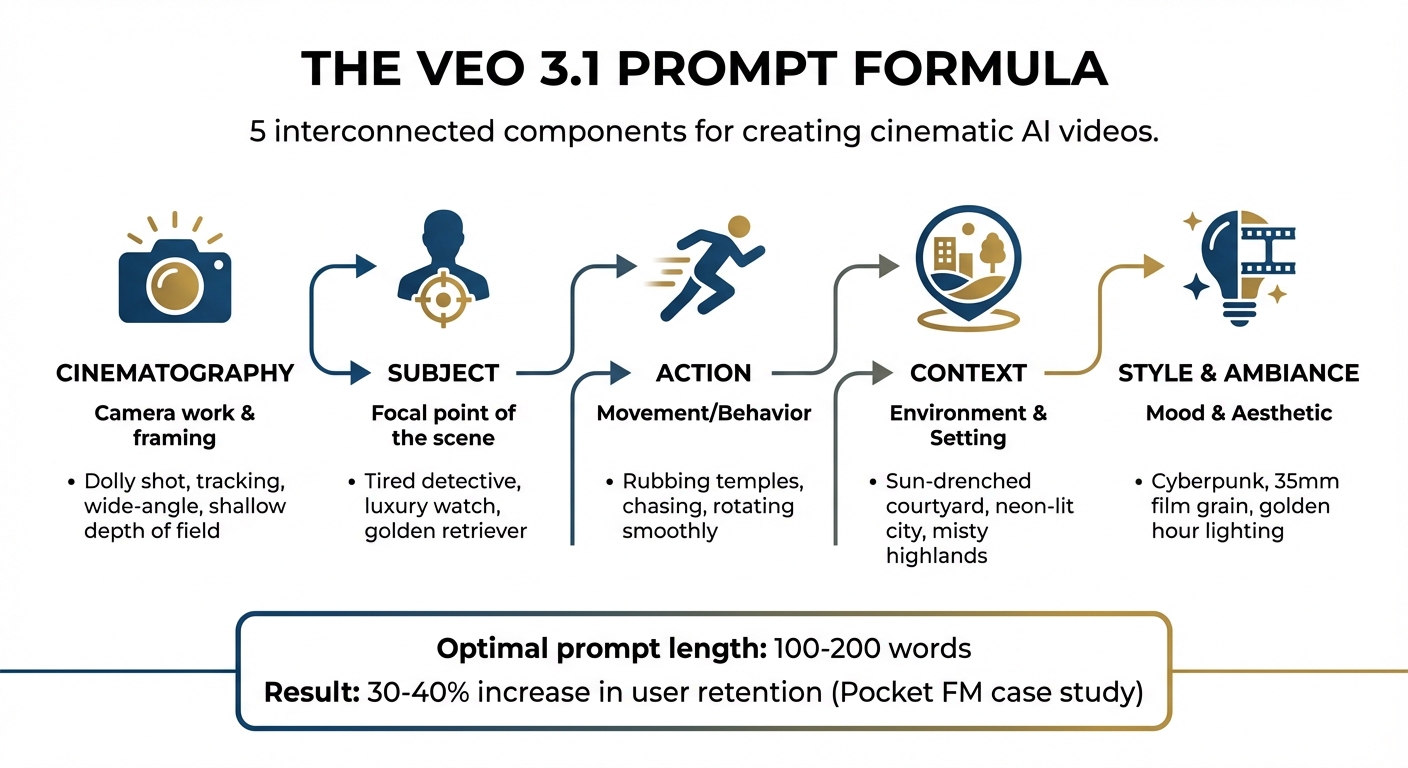
VEO 3.1 Prompt Formula: 5 Components for Cinematic AI Videos
Master The Ultimate Google Veo 3.1 Prompt Formula (Full Tutorial)
Understanding the VEO 3.1 Prompt Formula
The VEO 3.1 Prompt Formula operates like a filmmaker’s blueprint, breaking down into five key components: Cinematography, Subject, Action, Context, and Style & Ambiance. These elements work together to transform vague instructions into precise, professional-quality video outputs.
Each component plays a distinct role. The subject determines the focus of the scene. Cinematography defines how the camera captures that focus. Context sets the stage, describing the environment. Style and ambiance establish the mood, while audio elements bring the scene to life with synchronized sound. When combined, these components allow you to not just generate video but to direct it like a seasoned filmmaker.
Research indicates that prompts between 100 and 200 words yield the best results. Shorter prompts, under 50 words, often lead to generic outputs, while overly long prompts (over 300 words) can confuse the model with conflicting details.
Here’s a breakdown of how each component aligns with its function:
| Component | Function | Keywords |
|---|---|---|
| Cinematography | Camera work & framing | Dolly shot, tracking, wide-angle, shallow depth of field |
| Subject | Focal point of the scene | Tired detective, luxury watch, golden retriever |
| Action | Movement/Behavior | Rubbing temples, chasing, rotating smoothly |
| Context | Environment & Setting | Sun-drenched courtyard, neon-lit city, misty highlands |
| Style & Ambiance | Mood & Aesthetic | Cyberpunk, 35mm film grain, golden hour lighting |
The formula’s strength lies in its specificity. For example, instead of saying, "a man walks", you might write: "a weary office worker in his late 30s, wearing a wrinkled dress shirt, rubbing his temples as he walks through a rain-soaked city street at night." This level of detail prevents the AI from defaulting to generic visuals. As Prady K from DataGuy.in aptly stated, "The distance between prompting and directing is closing. In Veo 3.1, good language reads like a shot list".
Let’s dive deeper into each component to see how they work together to direct your scene.
Shot Type: Choosing Your Camera Angle
Cinematography is your primary tool for setting tone and emotion. By specifying camera movements – like dolly shots, crane shots, or tracking shots – and framing choices (e.g., close-ups, wide shots), you control how viewers experience the scene. A close-up can create intimacy, while a wide shot emphasizes scale and context.
Precise camera terms are essential. For example, say "dolly shot pushing in" instead of "camera moves closer", or "shallow depth of field with bokeh" rather than "blurry background." Using terms like steadicam, anamorphic lens, or parallax adds clarity and helps VEO 3.1 understand the cinematic look you want.
Camera movement can also convey meaning. For instance, a crane shot rising above a character might suggest isolation, while a tracking shot through a crowded space builds tension. Starting your prompt with a specific shot type, like "Extreme close-up" or "Wide-angle drone shot", sets the stage for immediate impact.
Subject and Action: What Happens on Screen
The subject and action components define who or what the scene focuses on and what they’re doing. For example, instead of "a woman", describe "a woman in her late 20s wearing a crimson sundress." Similarly, replace "a person runs" with "a lone hiker ascending a steep trail, pausing to catch her breath." These details provide VEO 3.1 with a richer foundation, capturing not just actions but the energy, pace, and subtle movements that bring the scene to life.
This component pairs seamlessly with cinematography. A close-up of "a detective rubbing his temples" combined with details like "tired eyes and disheveled hair" creates a vivid and emotionally resonant moment.
Scene and Environment: Where It Takes Place
Context sets the scene, describing the environment and background elements. Detailed descriptions make the footage immersive. For instance, say "a rain-soaked city street at night, neon signs reflecting in puddles" instead of simply "a street."
Location details matter. "Misty Scottish highlands" evokes a completely different feel than "sun-drenched Mediterranean courtyard." Time of day, weather, and architectural details all contribute to the scene’s authenticity. Adding elements like "distant mountains shrouded in fog" or "vintage storefronts with peeling paint" further enhances the realism and uniqueness of the setting.
Style and Lighting: Creating the Right Atmosphere
Once you’ve established the setting, style and lighting refine the mood. Here, you specify lighting conditions – like golden hour, rim lighting, or neon glow – and aesthetic references such as 35mm film grain or cyberpunk. These elements help ensure visual consistency and evoke the desired cinematic emotion.
Lighting plays a pivotal role. Terms like "volumetric lighting" create depth with visible beams, while "soft key light" offers flattering illumination. On the other hand, "harsh overhead fluorescent" sets an entirely different mood. The more precise your lighting descriptions, the more control you have over the final output.
Maintaining a consistent style across shots is crucial. For example, specifying "35mm film aesthetic with natural grain" or referencing "ARRI Alexa color science" helps VEO 3.1 achieve polished, cinematic results.
Audio Elements: Adding Sound and Music
Finally, sound ties everything together. With VEO 3.1, you can synchronize dialogue, sound effects (SFX), and ambient noise to create a complete audiovisual experience.
For dialogue, use quotation marks with clear attribution, like: "A woman says, ‘We have to leave now.’" For sound effects, specify explicitly: "SFX: thunder cracks" or "SFX: car engine revving." Ambient sounds, such as "Ambient: quiet hum of a starship" or "Ambient: distant city traffic", add depth to your scene.
How to Use the VEO 3.1 Formula
Now that you’re familiar with the five components, it’s time to put them into practice. The VEO 3.1 Formula works seamlessly across various video types – whether you’re creating a sleek product showcase or an emotional brand story. The trick is to tailor the formula to your specific goals while maintaining that polished, cinematic touch that sets professional content apart. Let’s dive into how this formula transforms product commercials with precision and storytelling flair.
Making Product Commercials
Product commercials thrive on sharp visuals and a clear focus. The product itself should always be the star, with cinematography and lighting working together to create a high-end appearance. Start by specifying the exact camera work. For instance, a prompt like "Macro slider shot, 85mm lens, shallow depth of field" ensures smooth motion and a beautifully blurred background.
Here’s an example for a luxury watch ad:
"Macro slider shot pushing in on a chronograph watch rotating on black velvet, studio setup with controlled rim and soft key lighting, 35mm film aesthetic with subtle grain, SFX: the precise mechanical tick of the watch movement."
This 40-word prompt is both detailed and concise, giving you the precision needed for a professional look.
Real-world results show that AI-generated promotional videos using this approach can boost user retention by 30-40% compared to traditional methods.
For consistency across multiple product shots, use the "Ingredients to Video" feature. By uploading a reference image of your product – like a specific sneaker or bottle design – VEO 3.1 ensures the visual identity remains consistent across different angles and lighting setups.
To achieve frame-perfect transitions, use timestamp prompting. For example:
[00:00-00:03] Wide shot of product on pedestal, dramatic lighting. [00:03-00:06] Quick zoom to extreme close-up of brand logo, volumetric lighting rays.
Keep each scene between 4-6 seconds to ensure stability and avoid motion jitter. For a 30-second commercial, it’s better to create five separate 6-second clips and stitch them together during editing rather than generating one long sequence.
Building Brand Stories
Brand storytelling takes a different approach by focusing on emotions and values rather than just showcasing products. This is where the formula’s emphasis on subject, action, and style shines, helping you craft videos that connect on a deeper level. Instead of simply displaying items, you’re capturing moments that reflect your brand’s identity.
Take an outdoor apparel brand as an example. A compelling prompt might be:
"Steadicam tracking shot following a solo hiker in her early 30s wearing a forest green jacket, ascending a steep mountain trail at dawn, pausing to catch her breath and gaze at distant peaks, misty Scottish highlands with morning fog rolling through valleys, golden hour lighting with warm rim light on her profile, 35mm film grain aesthetic, Ambient: gentle wind and distant bird calls."
This 72-word prompt captures an emotional moment that speaks to the brand’s adventurous ethos.
In October 2025, WPP, a global marketing agency, partnered with VEO 3.1 to explore its creative potential. Under Chief Innovation Officer Elav Horwitz, their teams used the "first frame, last frame" feature to revolutionize storytelling workflows. By uploading a starting image (e.g., a character looking uncertain) and an ending image (e.g., the same character smiling confidently), VEO 3.1 generates the emotional journey in between.
"Features like Veo 3.1’s ‘first frame, last frame’ capability are proving to be transformative, providing our teams with powerful new tools for narrative control and innovation."
– Elav Horwitz, Chief Innovation Officer, WPP
For longer narratives, timestamp prompting ensures character consistency across scenes. For example, a 12-second story might look like this:
[00:00-00:04] Wide shot of a woman entering an empty cafe, soft morning light streaming through the windows. [00:04-00:08] Medium shot as she orders coffee, with the barista smiling warmly. [00:08-00:12] Close-up of her hands wrapping around a warm cup, capturing an expression of contentment.
Establish your color palette early and stick to it throughout your prompts. For instance, specifying "warm tungsten practicals and cool teal mids" ensures a cohesive visual style. This level of consistency is what separates polished brand films from disjointed AI-generated clips.
Use emotional verbs to enhance the mood. Instead of generic phrases like "a person walks", try "walking with calm, deliberate steps" or "striding confidently through the crowd." These details help VEO 3.1 capture subtle body language that reflects your brand’s personality.
Next, we’ll explore how these techniques adapt to the fast-paced world of social media content.
Adapting Content for Social Media
Social media platforms demand a different approach. Instagram Reels and TikTok thrive on vertical 9:16 formats, with attention-grabbing action in the first two seconds. YouTube, however, favors longer, more immersive storytelling in a 16:9 landscape format.
Here’s an example for a vertical coffee brand clip:
"Vertical 9:16 format, whip pan from overhead shot of latte art to close-up of hands lifting a cup in a minimalist, naturally lit cafe with vibrant tones, upbeat energy, SFX: ceramic cup clinking on marble table."
This 38-word prompt captures the snappy, energetic style that performs well on social feeds.
| Platform | Aspect Ratio | Optimal Length | Key Strategy | Recommended Prompt Elements |
|---|---|---|---|---|
| Instagram Reels | 9:16 (vertical) | 7–15 seconds | High energy, centered subjects | "Vertical format, whip pan, saturated colors" |
| TikTok | 9:16 (vertical) | 7–21 seconds | Trend-driven, fast cuts | "Dynamic movement, bold lighting" |
| YouTube | 16:9 (landscape) | 15–60 seconds | Storytelling, atmosphere | "Cinematic framing, golden hour, narrative flow" |
| 16:9 or 1:1 | 15–30 seconds | Professional, clear messaging | "Clean composition, stable camera work" |
For high-volume content, use VEO 3.1 Fast. While it sacrifices some quality, it’s optimized for speed, making it perfect for testing multiple social concepts quickly.
In vertical formats, center the subject to avoid awkward cropping on mobile screens. Always specify "center the subject" in your prompt for clarity.
The "First and Last Frame" feature is ideal for creating seamless loops on platforms like Instagram or TikTok. For example, upload identical starting and ending images (like a coffee cup on a table) and prompt VEO 3.1 to animate the action in between – such as steam rising or a hand lifting and replacing the cup. This creates a smooth, attention-grabbing loop.
Lastly, don’t forget audio cues tailored to each platform. For TikTok, you might use "SFX: upbeat electronic music with bass drop" or "Dialogue: ‘Wait for it…’" to match its sound-driven culture. For LinkedIn, opt for "Ambient: quiet office atmosphere" or a professional voiceover to align with its tone.
sbb-itb-0df1f49
Advanced VEO 3.1 Techniques
Building on the core features of VEO 3.1, these advanced techniques are designed to tackle specific production challenges. Whether it’s ensuring character consistency across scenes or creating smooth, professional transitions, these tools take cinematic control to the next level.
Turning Images into Video
The "First and Last Frame" feature allows you to set the exact starting and ending points of your story. For example, you might begin with an image of a character looking uncertain and end with the same character smiling confidently. VEO 3.1 fills in the emotional journey, complete with natural motion and synchronized audio.
For product-focused projects, you could upload an image of a sneaker on a plain background as the first frame and a close-up of the sole as the final frame. To achieve realistic camera movements instead of basic crossfades, include the term "no crossfade" in your prompt.
The "Ingredients to Video" feature further ensures consistency. By uploading up to three reference images – such as a character’s face, a product, or a specific location – VEO 3.1 maintains their visual identity throughout the video.
Once your framework is ready, the next step is sequencing your shots effectively using timestamp prompts.
Using Timestamps for Multiple Shots
Timestamp prompting lets you choreograph an entire sequence within a single generation. By structuring your prompt with time segments like \[00:00-00:02\], you can assign specific actions and camera movements to precise moments.
For example, Google Cloud showcased this technique in October 2025 with a jungle explorer sequence:
- [00:00-00:02]: A medium shot from behind a female explorer as she pushes aside a jungle vine.
- [00:02-00:04]: A reverse shot capturing her awe as she gazes at ancient ruins, paired with the sound of rustling leaves.
- [00:04-00:06]: A tracking shot as she runs her hand over intricate stone carvings.
- [00:06-00:08]: A wide, high-angle crane shot revealing a sprawling temple complex with a dramatic orchestral score.
Keep individual shots between 4–6 seconds to minimize jitter. For continuity, use temporal hooks like consistent costumes, props, or weather elements across scenes. Match-action cues such as "continues turning right" or "steps into the light" help ensure smooth transitions between cuts.
Once your shots are sequenced, maintaining high-quality visuals and audio becomes the focus.
Keeping Visual and Audio Quality Consistent
Consistency is the hallmark of a polished production. Start by creating a character bible with 2–3 neutral reference images to anchor the design across all scenes.
Define a color palette early and stick to it across your prompts to give the video a unified look.
For audio, reuse specific ambient descriptors like "city hum" or motif elements such as "subtle synth motif" to maintain a coherent soundscape. Use negative prompts like "no wardrobe changes," "no hair color changes," or "no text" to avoid unwanted variations.
In October 2025, Umesh Bude, CTO of Pocket FM, shared that over 100 team members were using VEO 3.1 weekly. The tool’s ability to deliver lifelike lip-sync and cinematic quality resulted in a 30–40% boost in user retention for their flagship shows.
"At Pocket FM, we’ve always believed that great storytelling deserves great visuals. With VEO 3.1, our creators finally have a gen AI tool that matches that ambition."
– Umesh Bude, CTO, Pocket Entertainment
Conclusion
The VEO 3.1 Prompt Formula has redefined video creation, turning it into a process of precise, cinematic storytelling. By structuring prompts with [Cinematography] + [Subject] + [Action] + [Context] + [Style & Ambiance], you can craft a detailed shot list that the AI executes flawlessly. This eliminates the guesswork and endless trial-and-error cycles that often bog down video production.
This method isn’t just efficient – it’s transformative. Traditional video production demands significant resources, from hiring crews to securing equipment and locations, often taking weeks to deliver results. With VEO 3.1, you can produce long-form cinematic TV and digital ads in just minutes. For example, QuickFrame by MNTN integrated VEO 3.1 in October 2025, showcasing how it drastically improves production efficiency.
The benefits extend beyond speed. Features like "Ingredients to Video" ensure brand consistency by incorporating reference images of logos, products, or characters. Timestamp prompting allows for multi-shot sequences to be generated in one go, eliminating the need for extensive manual editing. These tools empower smaller teams to produce high-quality content at a pace that once required a full studio.
The formula’s impact is also measurable. When Pocket FM adopted VEO 3.1 for their creative team in October 2025, they saw a 30–40% increase in user retention for their flagship shows. Even more impressively, they achieved acquisition results comparable to costly live-action campaigns – all while saving time and resources. These results highlight how each element of the VEO 3.1 formula contributes to delivering cinematic-quality content.
FAQs
How does the VEO 3.1 Prompt Formula improve video quality and storytelling?
The VEO 3.1 Prompt Formula turns basic text descriptions into detailed, ready-to-use instructions, enabling AI to create videos with a cinematic edge. By dissecting each scene into essential components – like subject, location, action, camera angle, lighting, and style – it ensures the AI captures both the visual and narrative intricacies.
This method guarantees smooth motion, consistent lighting, and character continuity throughout sequences, resulting in polished, high-quality videos. By incorporating film-specific terms such as dolly zoom or golden-hour lighting, the AI mimics advanced cinematography techniques, producing videos that feel as though they were crafted by a skilled filmmaker. This formula removes uncertainty and visual mismatches, offering creators a reliable way to achieve cinematic-level content.
What is the ideal prompt length for getting cinematic results with VEO 3.1?
When working with VEO 3.1, aim to keep your prompts between 100 and 200 words. This range offers just the right amount of detail for the AI to create high-quality, cinematic outputs without losing focus or clarity.
Steer clear of prompts that are too short, as they might not provide enough context. On the flip side, overly lengthy prompts can muddle the message and reduce precision. Finding this sweet spot helps the AI interpret your input effectively and produce professional-grade video content.
How does the VEO 3.1 Prompt Formula help ensure brand consistency in video projects?
The VEO 3.1 Prompt Formula is a game-changer for keeping your brand identity consistent. It allows you to embed your brand’s visual and tonal guidelines directly into the prompt. Think of it as setting the foundation – elements like logo placement, color schemes, typography, and signature lighting can be defined once and reused across all your scenes. This way, every video you create stays true to your brand’s style.
The formula’s organized structure – Subject → Scene → Action → Style → Camera → Audio – lets you lock in brand-specific details effortlessly. Whether it’s maintaining a consistent color tone or ensuring smooth camera movements, this layout helps establish a cohesive visual language across your videos. Plus, VEO 3.1 goes a step further by tracking character and asset consistency, so your mascots, products, or spokespeople look the same in every piece of footage.
By combining reusable prompts, built-in identity tracking, and cinematic presets, VEO 3.1 streamlines the process of creating polished, professional video series that are unmistakably aligned with your brand.
Related Blog Posts
- Common Mistakes to Avoid When Creating AI-Generated Videos
- Prompt Engineering for AI Video: The Complete Guide to Getting the Results You Want
- The Art of Descriptive Language: Writing Prompts for Cinematic AI Videos
- Troubleshooting Bad AI Video Results: How to Refine Your Prompts for Better Outcomes