Director Level Protocol (DLP) is a shared directing format for AI video. I’d define it simply: you set a shot in film terms once, and the system translates that shot for each video model. That matters because, in one test across 500 prompts, short prompts of 5 to 10 words matched intent only 22% of the time, while longer director-style prompts of 80 to 120 words reached 83%.
Here’s the short version:
- I use film-style shot controls instead of loose prompt text
- DLP stores direction for each storyboard shot
- The same shot can be compiled for different models
- I can see if a model supports a direction natively, approximately, or not at all
- DLP covers 8 shot areas:
- Framing
- Lenses
- Camera movement
- Blocking
- Coverage
- Performance
- Color
- Edit rhythm
In other words, DLP sits between my storyboard and the model. I direct the shot once, and the platform handles the model-specific output underneath. That helps cut down on prompt guesswork, keeps direction more consistent across shots, and lets me switch models without rewriting the whole scene.
If I had to sum it up in one line, it’s this: DLP turns directing choices into a structured shot record that AI video models can use.
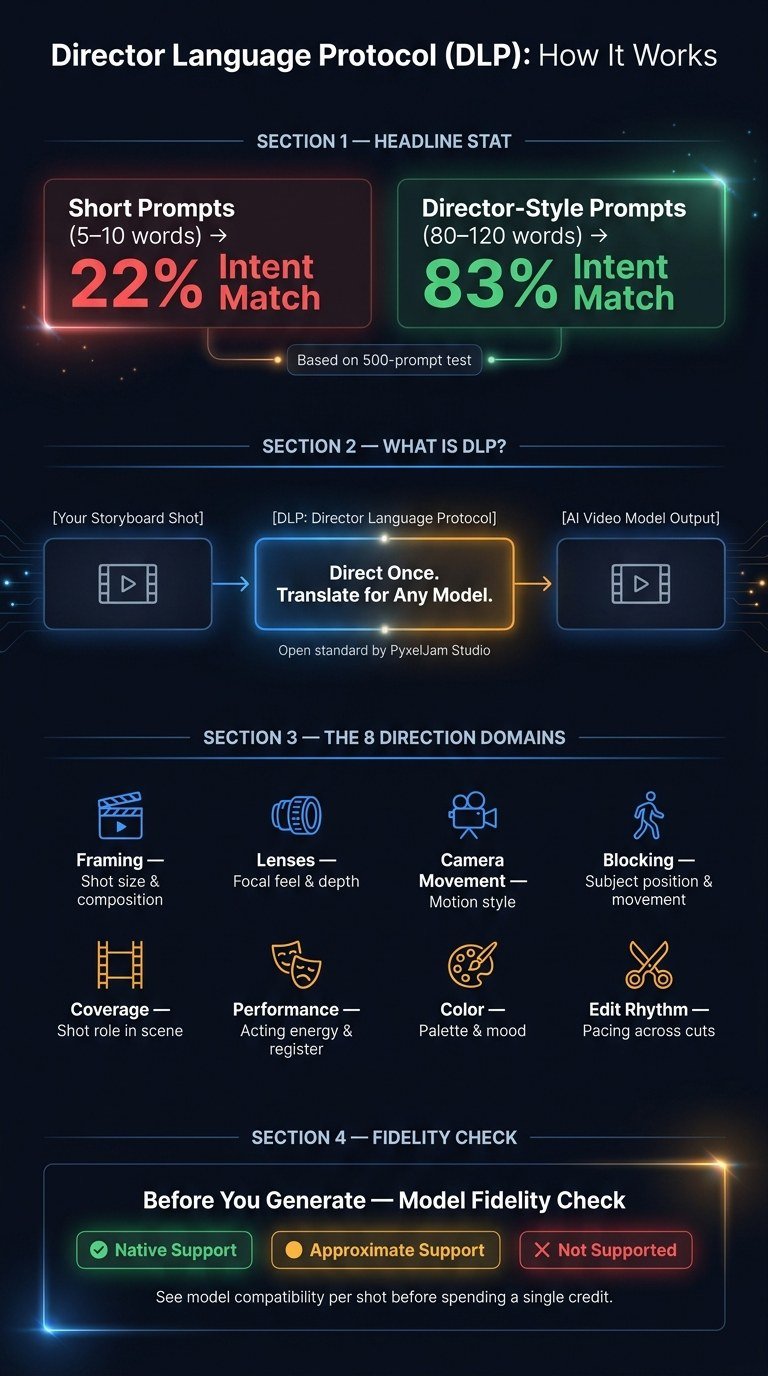
DLP vs Standard Text Prompts: AI Video Directing Explained
What Is DLP?
The Director Language Protocol (DLP) is an open standard from PyxelJam Studio that turns film-directing language into structured instructions AI video models can follow.
PyxelJam is the first platform built on an open director-language protocol. That means your creative choices stay in one place while the translation happens underneath. That setup is what makes per-model translation possible.
Why AI Video Workflows Need a Director-Language Layer
A lot of AI video tools are all over the map. Some ignore film language. Some only understand part of it. Others push you into their own prompting dialect. The result is prompt roulette and burned credits.
A structured direction layer fixes that by giving the platform precise shot intent before generation starts.
How DLP Differs from a Standard Text Prompt
A standard text prompt is freeform. It doesn’t come with fixed structure, defined fields, or a steady link from one shot to the next.
DLP works differently. It stores direction once for each storyboard shot in a format that works across models. Then, when you compile that shot for a given model, the platform translates the same direction into that model’s native dialect. The core direction stays the same across models.
Those shared fields are organized into eight vocabulary domains.
What Vocabulary Does DLP Cover?
Those shared fields break into eight domains: framing, lenses, camera movement, blocking, coverage, performance, color, and edit rhythm. Put simply, each one takes a directing decision and turns it into a structured control that AI video models can follow.
What the 8 Direction Domains Mean in Practice
Each domain handles a different part of the shot. Here’s what each one controls in plain English:
| Domain | What It Controls |
|---|---|
| Framing | Shot size and composition – how close the camera is and where the subject sits in frame |
| Lenses | Focal feel and depth – compressed, wide, or between the two |
| Camera Movement | Motion style – static, handheld, tracking, or other movement patterns |
| Blocking | Where subjects are positioned and how they move through the scene |
| Coverage | The role each shot plays in a scene – establishing, insert, reaction, and more |
| Performance | Acting energy and emotional register – restrained, heightened, naturalistic |
| Color | Palette and mood – warm, cool, desaturated, high-contrast |
| Edit Rhythm | Pacing across cuts – fast or slow |
DLP maps these directing choices into structured controls instead of leaving everything to freeform prompts.
Can Non-Directors Use This Vocabulary?
Yes. You don’t need a film background to use it.
Every direction comes as a labeled choice with a plain-English note about what it does. That makes the vocabulary easy for non-directors to work with. Then those same choices get compiled for each model.
How Per-Model Translation Works
Set the direction for each shot in the storyboard, save it in one standard format, and compile it for the model you choose. You direct once in film language; DLP turns that into each model’s native dialect. That saved direction is what lets you switch models without rewriting the shot.
What Happens When You Switch Models
DLP keeps each shot as the source of truth, so switching models doesn’t mean rebuilding the storyboard. Only the compiled output changes. If one model misses the mark, you can switch to another without reworking the scene. Blocking, coverage, and color stay in place. And when DLP adds a translation for a new model, your existing shots work with it right away.
How the Fidelity Check Prevents Wasted Credits
Before you generate a single frame, each shot shows which directions the chosen model supports natively, approximately, or not at all. That visibility is there on purpose.
If a model doesn’t support a direction you care about, you see it up front. Then you can:
- adjust the direction
- accept the approximation
- choose a different model
All of that happens before you spend anything. That kind of honesty matters at the shot level, but DLP’s bigger edge shows up at the scene level, where continuity has to hold across cuts.
How DLP Handles Direction Across Cuts
DLP carries direction across the whole scene, not just a single shot. Because the scene shares one direction record, coverage roles, screen direction, and pacing survive the edit.
Prompt-level direction stops at the shot. DLP carries coverage roles, screen direction, and pacing across the scene.
Is DLP Really Open?
Open means DLP is a standardized director-language layer, not a prompt format tied to one model. PyxelJam authored DLP, the first platform built on an open director-language protocol.
The main point is portability: the same direction survives model changes.
That matters because it keeps finished direction usable as models change. In practice, your shots stay portable even when the underlying model changes. And your direction stays revisable without locking you into one model’s syntax.
If you want the full product context, you can learn more about PyxelJam Studio’s DLP here.
FAQs
How is DLP different from a prompt template?
DLP is a translation layer, not a static prompt template. A prompt template is plain text you have to rewrite for each AI model. DLP turns film-directing language into a structured format and stores it for each shot.
The platform then compiles that direction into the native language of the model you choose. So if you switch models, your direction stays the same, and the translation updates on its own.
Can I use DLP without film experience?
Yes. DLP is built for people with zero film background.
Each direction is a labeled choice with a clear, plain-English explanation. That means you can use pro film terms without having to memorize jargon or go to film school.
What happens if a model does not support a shot direction?
Before you spend credits, the platform runs a fidelity check. It shows which directions the model supports natively, which ones it can approximate, and which ones it can’t support at all.
Your direction also stays in one standard format. So if you switch models, you can keep the same shot direction while the platform translates it into each model’s native dialect.