If I’m about to spend $25,000 to $250,000+ on a sponsored series, I need a clear go/no-go check before launch. The big things I need to lock down are: audience fit, partner risk, rights, production specs, disclosure, distribution, and tracking.
Here’s the short version:
- Pick one audience and one main goal before I sign anything
- Check audience quality, not just reach, with signals like 70%+ U.S. audience share and strong watch time, scroll depth, or listen-through
- Review the partner’s last 12–24 months of content for tone, safety issues, and audience behavior
- Approve FTC disclosure early so “Sponsored by [Brand]” is clear in every format
- Get rights in writing for reuse, paid media, timing, territory, and raw files
- Set production specs and review rounds before work starts
- Map distribution and paid support by channel, date, time, and geo
- Test UTMs, pixels, and dashboards 2–3 days before launch
- Run a final go/no-go review the day before launch; any blocker stops the campaign
A few numbers matter here. If a partner has less than 70% U.S. audience share, weak repeat engagement, or poor reporting access, I’d pause. And if video completion events or disclosure placement fail QA, I would not launch.
This checklist is about one thing: cutting avoidable risk before money goes out the door.
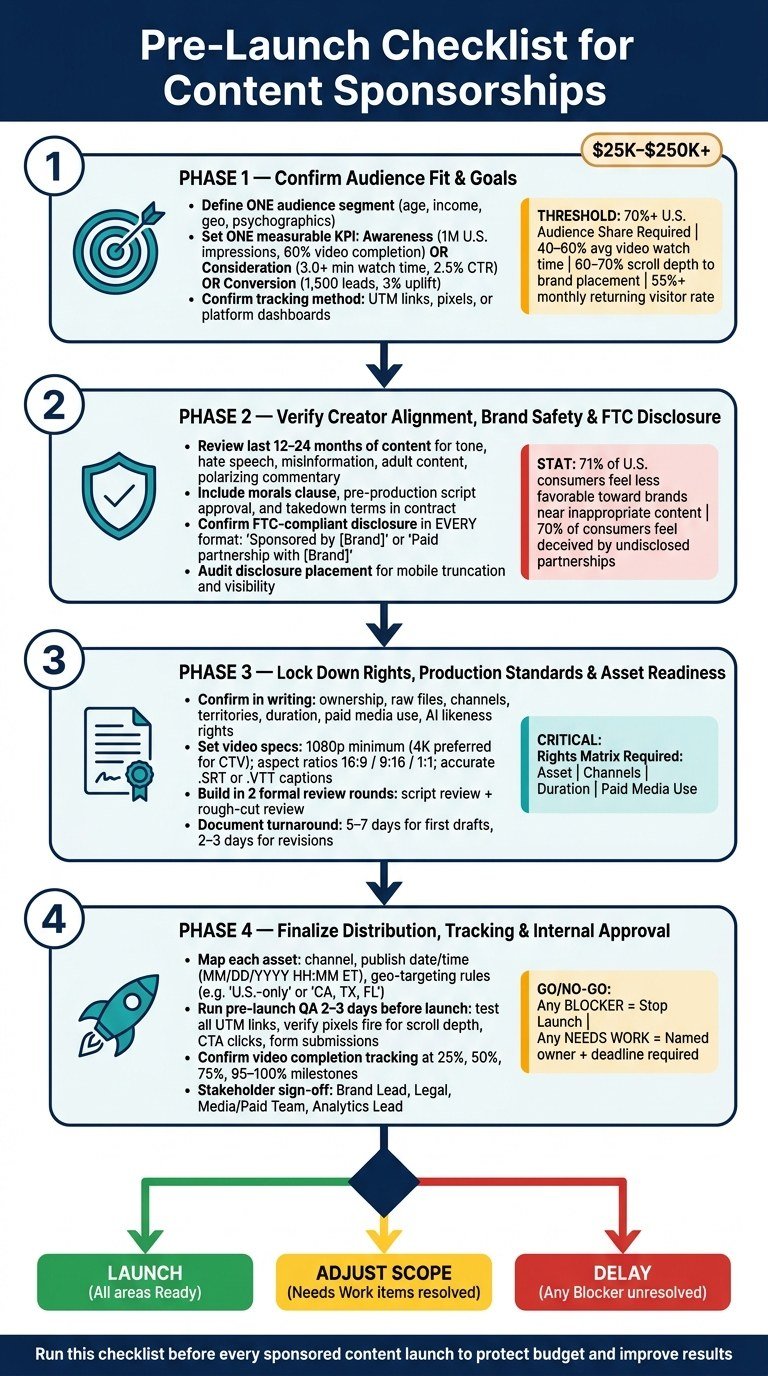
Pre-Launch Checklist for Content Sponsorships: Go/No-Go Framework
1. Confirm Audience Fit and Sponsorship Goals
Use audience data to rule out weak fits before you spend time on rights, production, or launch approvals.
Define Your Target Audience, Campaign Objective, and KPI Before Signing
Start with the sponsor brief and narrow it down to one audience and one measurable result before you review any contract.
Pick one primary U.S. audience segment first: age, income, geography, and psychographics. For example, you might target adults ages 25–44 with household income of $75,000–$150,000, across the U.S. or in priority DMAs like Chicago or Los Angeles, with interests and lifestyle patterns that line up with your brand.
Then choose one main objective and assign a numeric target to each KPI:
- Awareness: U.S. impressions from the right audience and completion rates, such as 1,000,000 U.S. impressions and a 60% video completion rate
- Consideration: time spent with the content and click-throughs, such as 3.0+ minutes average watch time and a 2.5% CTR
- Conversion: direct leads or sales, such as 1,500 qualified leads and a 3% uplift in conversion rate
Before the deal is signed, confirm how each KPI will be tracked. That usually means UTM links, pixels, or platform dashboards.
Check Audience Quality, Not Just Audience Size
Don’t let follower count do all the talking. What matters more is U.S. share, engagement depth, and repeat exposure.
Aim for at least 70% U.S.-based audience. Performance tends to drop when too many impressions go to non-U.S. users.
A few benchmarks help here:
- Video: 40%–60% average watch time among U.S. viewers shows real attention
- Articles: 60%–70% scroll depth to the brand placement means people are likely to see the sponsorship
- Audio: a high listen-through rate is a strong sign
It also helps to read recent comments. If a large share of them are specific and thoughtful, that usually points to a community that responds better to integrated brand content. If the comments look generic or full of spam, treat that as a red flag no matter how big the audience is.
Look at repeat engagement too. A 55% or higher monthly returning visitor rate – or strong series completion rates – usually means the audience has a steady relationship with the creator or publisher. That tends to help branded integrations perform better over repeated exposure.
If a partner misses these thresholds, cut it from the list.
Compare Publishers or Creators Side by Side Before Approval
Once you’ve gathered data on a few candidates, put them in a table. It makes trade-offs easier to spot and helps everyone involved compare options without talking in circles.
| Criteria | Creator A | Publisher B | Creator C |
|---|---|---|---|
| Audience Match (U.S. target 25–34) | High (strong fit) | Medium (skews 35–44) | High (niche, very aligned) |
| U.S. Reach (avg per sponsored episode) | 250,000 viewers | 400,000 readers | 125,000 listeners |
| U.S. Audience Share | 82% | 68% | 91% |
| Engagement Quality | 5.2 min avg watch time; topic-specific comments | 70% scroll depth; moderate comment quality | 75% listen-through; highly engaged reviews |
| Repeat Engagement | 48% returning viewers/mo | 35% returning readers/mo | 60% returning listeners/mo |
| Historical Sponsored Content Performance | +18% brand recall lift; +2.3% CTR to landing page | +10% awareness lift; +1.5% CTR | +22% brand favorability lift |
| Estimated Cost per Campaign (USD) | $65,000 | $80,000 | $50,000 |
Use the table to choose the partner with the best mix of audience fit, engagement quality, and cost for your main goal.
Once a partner clears the audience-fit thresholds, move to creator alignment, brand safety, and disclosure.
sbb-itb-0df1f49
2. Verify Creator Alignment, Brand Safety, and FTC Disclosure
Once a partner passes your audience-fit checks, the next step is simple: look at their track record, check brand-safety risk, and lock in disclosure rules before you sign anything.
Review Content History, Tone, and Brand Safety Risk
Review the last 12–24 months of content across the creator’s main channels to spot recurring themes, tone, and visuals that clash with your brand. Watch for patterns, not just one-off posts. Flag any of the following:
- Hate speech or harassment
- Adult content or misinformation
- Illegal activity
- Highly polarizing political or social commentary
This matters more than a lot of teams think. 71% of U.S. consumers say they’d feel less favorable toward a brand whose ads appear near inappropriate content, and 48% say they’d abandon a brand they otherwise loved if its ad ran alongside objectionable online content.
Topic is only part of the picture. Tone matters just as much. A creator might avoid obvious red flags and still be a poor fit if their style leans on shock humor, profanity, or confrontational commentary. That can clear broad brand-safety filters but still miss the mark for a professional or family-friendly brand.
It’s also smart to check comment sections and shared posts. If the audience brings toxic behavior or organized harassment into the mix, that can spill over onto the partnership even if the creator’s own posts look clean on the surface.
Before signing, include at least:
- Morals clause
- Pre-production approval for scripts and concepts
- Takedown timing and cost responsibility
Once the partner clears brand-safety review, set disclosure language and placement before the team starts making content.
Confirm FTC-Compliant Disclosure Across Every Format
The FTC requires any material connection – cash, gifts, discounts, affiliate commissions, or free travel – to be disclosed clearly and conspicuously in every endorsement placement. In plain English, people should be able to see it without hunting for it. That means no hiding disclosures below the fold, behind “see more,” or inside dense legal copy.
The FTC has also made it clear that video disclosures must appear inside the video itself, not just in the description, because many viewers never read the surrounding text.
Plain wording is the rule. Labels like “Sponsored by [Brand],” “Paid partnership with [Brand],” or “This video is sponsored by [Brand]” meet the bar. Vague labels like “Thanks to [Brand]” do not.
And yes, people notice when brands try to slide past this. 70% of consumers feel deceived when they discover an undisclosed partnership, and 67% report feeling deceived after realizing an article or video was sponsored.
Before launch, audit the wording, placement, truncation, and mobile display for every format. Make it a required approval step, not a last-minute check.
Disclosure Format Reference Table for Articles, Video, and Audio
Use the table below as the launch-day disclosure checklist.
| Format | Where Disclosure Must Appear | Acceptable Wording | Format |
|---|---|---|---|
| Article / Blog / Editorial | Near the headline or byline; visible in teaser/preview blocks before truncation | "Sponsored by [Brand]" or "This article is part of a paid partnership with [Brand]" | Visual only (text) |
| Video (YouTube, TikTok, Reels, streaming series) | Spoken near the start; on-screen text when sponsorship is introduced; platform "paid partnership" tag if available | "This video is sponsored by [Brand]" or "Paid partnership with [Brand]" | Both visual and audio |
| Podcast / Audio series | Spoken at episode start and before or after each ad segment; written in show notes | "This episode is sponsored by [Brand]" or "Now a message from our sponsor, [Brand]" | Audio required; show notes recommended |
For multi-episode series, repeat the disclosure in every episode and add the wording to scripts and templates.
3. Lock Down Rights, Production Standards, and Asset Readiness
With brand safety and disclosure handled, the next step is simple: sort out rights, specs, and approvals before production begins.
Confirm Ownership, Licensing, and Reuse Terms in Writing
Get six items confirmed in writing: ownership, raw files, channels, territories, duration, paid media use, and future reuse of image, voice, or synthetic likeness.
A simple rights matrix helps a lot here. It’s just a table that lists each asset, where it can run, how long it can be used, and whether it can support paid promotion. That way, your team doesn’t have to dig through contract language every time someone asks, “Can we boost this post?” If usage rights stretch across more channels, more time, or paid media, a higher fee can make sense because the asset does more work.
If AI-made elements are part of the project – avatars, synthetic voice, or virtual hosts – add a separate clause that spells out which parts are AI-generated, who owns them, and whether the brand can ask for new scenes with the same model without extra talent fees. Think of these terms as the bridge between the contract and the actual production work.
Set Technical and Editorial Quality Standards Before Production Starts
Lock the specs early so you don’t end up paying for edits that could have been avoided.
For video, require at least 1080p, with 4K preferred for CTV or top-tier placements. Match the aspect ratio to the channel: 16:9 for YouTube and web, 9:16 for TikTok and Reels, and 1:1 for some feed placements. Audio should be clean, and captions should be accurate, time-synced, and delivered as a separate .SRT or .VTT file.
If budget or timing is tight, plan around a single master version that can be cropped into all three aspect ratios. That one move can cut out reshoots and keep costs from drifting.
On the editorial side, build in at least two formal review rounds:
- A script review to check messaging, claim language, and brand voice
- A rough-cut review to check visuals, pacing, and caption accuracy
For AI-assisted production, add a few more checks. Review voice pacing, pronunciation of brand and product names, and visual consistency from scene to scene.
Prepare PyxelJam Deliverables and Approval Milestones

For PyxelJam production, hand over brand guidelines, approved messaging, needed deliverables, and the launch date before work starts. That includes logo files, color palette, typography, a messaging framework with approved CTAs and required disclosure language, plus a clear list of deliverables – for example, one 30-second hero video, three 10–15-second social cut-downs, static thumbnails, and a caption file.
PyxelJam’s AI production workflow creates visuals and voiceovers that match your brand look and voice. Use a three-step approval flow with named owners and set feedback windows: concept, script, and final asset review. It also helps to document turnaround times as working-day ranges – 5–7 days for first drafts and 2–3 days for revisions – so small teams don’t get jammed up at the last minute and miss the launch date.
Once assets are approved, move them into channel mapping, tracking, and launch sign-off.
4. Finalize Distribution, Tracking, and Internal Launch Approval
Map Distribution by Channel, Timing, and Paid Support
Once the asset is approved, lock the launch plan. That means deciding where it runs, when it goes live, and how paid support will back it up.
For each asset, document:
- the channel and format, such as publisher site, YouTube, podcast feed, Instagram, or email newsletter
- the publish date and time in MM/DD/YYYY and HH:MM a.m./p.m. ET
- the time zone
- the paid-support flight dates
You should also list owned, earned, and paid placements for every asset. For paid channels, set frequency caps and write down geo-targeting rules like "U.S.-only" or "CA, TX, FL for retail messaging". That keeps spend from drifting into markets that aren’t a priority.
After placement is locked, make sure every link and event can be measured.
Validate Dashboards, Tracking, and Reporting Access Before Launch Day
Run a pre-launch QA 2–3 days before launch. Click every test link, watch the content, and use a tag debugger to make sure each event fires the way it should.
At the URL level, confirm that all links use the same UTM structure: utm_source, utm_medium, utm_campaign, and utm_content. Then check that traffic lands in the right campaign view inside your analytics platform.
At the site level, verify that pixels and event tracking fire for:
- scroll depth
- CTA clicks
- form submissions
At the media level, confirm that video players track starts, 25%, 50%, 75%, and 95–100% completion. Those events also need to pass into your reporting dashboard. For podcasts, make sure download and listen metrics are part of the reporting setup.
Before launch day, confirm that every stakeholder who needs reporting access already has it. Check permission levels, make sure internal reporting templates use the new campaign name and IDs, and run a quick dry run by pulling a sample report and sharing it with the team so everyone knows what they’ll be looking at.
Use a Risk and Readiness Table for the Final Go/No-Go Decision
Run a go/no-go review the day before launch. This is the last checkpoint, and it’s the moment to stop the launch if there’s any open legal, tracking, or approval gap.
Each stakeholder – the brand lead, legal, media/paid team, and analytics lead – marks their area as Ready, Needs Work, or Blocker.
- Any Blocker stops the launch.
- Any Needs Work item must have a named owner and a resolution deadline before the content goes live.
| Area | Status | Notes |
|---|---|---|
| Audience fit & goals | Ready | KPIs agreed with publisher; targets documented |
| Creator alignment & brand safety | Ready | Content history reviewed; no flags |
| Rights & reuse | Ready | Contract covers 12-month U.S. reuse |
| Production quality & assets | Ready | Final cuts delivered and QC’d |
| FTC disclosure & compliance | Ready | Labels confirmed for all formats and placements |
| Distribution plan | Needs Work | Paid-social geo-targeting not finalized |
| Tracking & analytics | Blocker | Video completion events not firing in test |
| Internal approvals | Ready | All stakeholders signed off |
Record any unresolved targeting or measurement gaps before launch.
Conclusion: The Pre-Launch Checks That Protect Budget and Improve Results
The final readiness table should answer one question: launch now, delay, or adjust scope.
Before anything goes live, check four things: audience fit, creator alignment, usage rights, and measurement. If one of them is weak, fix it before you spend a dollar.
That call depends on measurement just as much as creative quality. Track more than one KPI, and make sure reporting access is set up before launch so you can measure results from day one.
Pick partners whose audience mix and content style line up with your buyer profile, not just the ones with the biggest reach.
Approve disclosure before launch. Clear and conspicuous labeling is part of the launch gate, not something to patch in later.
When teams use this checklist every time, it becomes a repeatable launch gate: launch, delay, or adjust scope based on risks that still haven’t been resolved.
FAQs
What should I do if a partner misses one key threshold?
Treat it as a red flag. Pause and dig into the issue before you put in more time, budget, or effort.
Start by checking whether you can fix it through negotiation. That might mean adjusting the creative, tightening expectations, or adding optimization clauses to improve results over time.
If the partner can’t share clear performance data, or if the deal brings up content alignment or brand safety concerns, it may be time to use your termination clause. Put your brand safety guardrails and your main goals first.
How early should I lock rights and approval workflows?
As early as possible in pre-production. Review scripts and storylines before filming starts so you can spot reputation risks before they turn into bigger problems.
Contracts should clearly spell out approval rights, usage rights for marketing materials, and brand safety guardrails before production begins. It also helps to set feedback and compliance checkpoints from the start so the project stays aligned and on schedule.
Which launch issues are serious enough to delay the campaign?
Delay the campaign if critical brand safety, legal, or day-to-day basics aren’t locked in. Put it on hold if documented talent consent for AI-generated likenesses or voices is missing, legal hasn’t cleared third-party intellectual property use, or data security and privacy protocols haven’t been fully verified.
Also delay if there’s major internal misalignment on budget or goals, if brand safety protocols are missing, or if scripts haven’t been vetted for negative narrative associations.
Related Blog Posts
- How to Choose the Right Video Production Company: 7 Essential Questions to Ask
- How to Negotiate Product Placement Deals That Actually Benefit Your Brand
- How Small Businesses Can Afford Product Placement (Yes, Really)
- The Ultimate Checklist for Measuring Product Placement Success