If you want better results from streaming, don’t start with a platform. Start with one goal. Then match that goal to the right format, pick creators whose audience fits your buyers, lock down terms in writing, and track results with links, codes, and revenue data.
Here’s the short version:
- Pick one main goal: awareness, engagement, traffic, signups, or sales
- Choose the right format: sponsored segment, product placement, branded content, or a longer creator deal
- Prioritize fit over size: a smaller creator with the right audience can beat a broad buy
- Set terms before launch: deliverables, usage rights, disclosure, timing, and reporting
- Measure what matters: views, watch time, clicks, signups, bookings, revenue, and ROAS
A few numbers make the case. A mid-tier YouTube integration can run about $1,500 to $10,000 per placement, while some Twitch sponsored segments can start in the low hundreds of dollars. That gives smaller teams room to test more than one partner instead of putting the full budget into one placement.
My take: brand integrations work best when the brand feels like part of the show, not a break in it. That usually means short talking points, a clear CTA, proper FTC disclosure, and a simple reporting setup from day one.
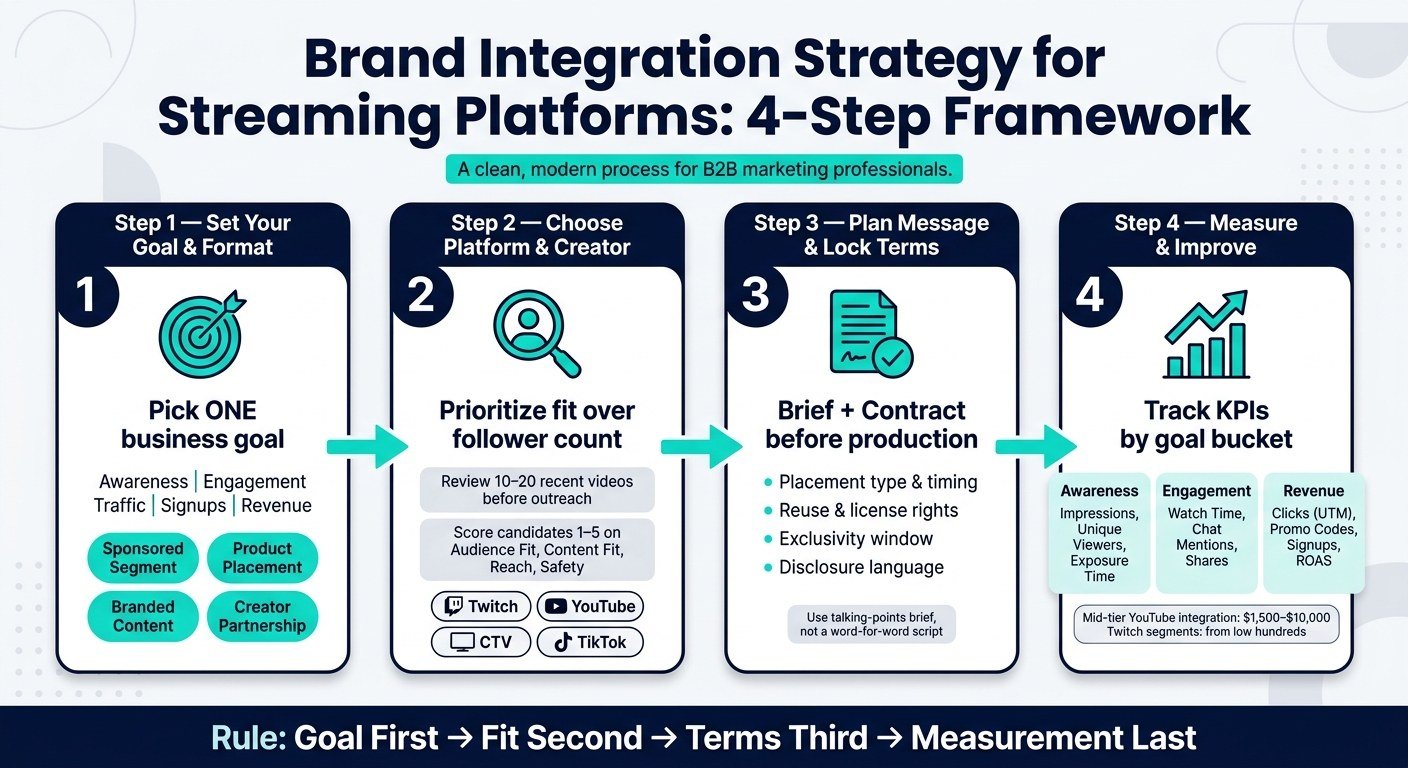
Brand Integration Strategy for Streaming: 4-Step Framework
Inside Netflix‘s fandom-driven brand partnerships | Future of Advertising | Deloitte Insights
sbb-itb-0df1f49
Quick comparison
| Format | Best for | What it looks like | Main KPI |
|---|---|---|---|
| Sponsored segment | Traffic, signups, sales | Creator pauses content for a short brand mention | CTR, CPA, signups |
| Product placement | Awareness | Product appears on screen during content | Impressions, exposure time |
| Branded content | Traffic, deeper interest | Brand helps fund or shape a full episode or series | Sessions, signups, revenue |
| Creator partnership | Engagement, sales over time | Repeat mentions or multi-month deal | Conversions, ROAS, repeat lift |
If I were building a plan today, I’d keep it simple: goal first, fit second, terms third, measurement last – and I’d ignore vanity numbers unless they connect to business results.
1. Set campaign goals and choose the right integration format
Start here: pick one business goal before you look at platforms or reach out to a creator. Write that goal as a SMART goal. For streaming integrations, stick to a single main target – awareness, engagement, traffic, signups, or revenue. When that part is locked in, choosing a format and tracking results gets much simpler.
Match your goals to the right streaming placement type
Pick the format based on the action you want most.
| Goal | Best Format(s) | Key KPIs |
|---|---|---|
| Brand awareness | Product placement, short sponsored segments, stream sponsorships | Impressions, CPM, brand lift |
| Engagement | Creator partnerships, interactive sponsored segments, live integrations | Engagement rate, watch time, chat activity |
| Traffic and signups | Branded content, sponsored segments with clear CTAs, creator links | Sessions, CTR, CPA, signups |
| Revenue and ROAS | Creator partnerships with promo codes or affiliate incentives, branded content | Conversions, ROAS, revenue |
For a local U.S. service business – say, an HVAC company in Dallas–Fort Worth – a creator partnership with a local lifestyle or home-improvement streamer can work well if the goal is more calls or booked appointments. The key is simple: the audience needs to overlap with your local service area.
Build a format selection checklist before spending money
Before you put dollars on the line, run through these six checks:
- Brand objective: Does this format support your main goal?
- Audience match: Does the creator or platform reach your target U.S. audience?
- Content fit: Does your product make sense in that content category?
- Creative flexibility: Can you test different CTAs or message angles?
- Expected reach: What are the usual views, concurrent viewers, or impressions per episode?
- Reporting: Can you track performance with links, promo codes, or custom landing pages?
For CPM deals, divide the fee by expected views and multiply by 1,000. For performance deals, set a maximum CPA before you negotiate.
Once you know the goal and format, use that as your filter for platforms and creators.
How PyxelJam helps you produce creative faster and at lower cost

PyxelJam helps you turn out sponsored segments, branded intros, and promo variations without needing a full production crew. That means you can test more versions for less money. With those assets ready, the next step is to narrow things down by platform and audience fit.
2. Choose streaming platforms, creators, and audience fits
Next, pick the platforms and creators that line up with your plan. Go for the closest audience match, not the biggest possible reach. Big numbers can look great on paper, but if the viewers don’t match your buyer, that reach won’t do much. At this stage, the job is simple: check whether the audience and the content fit.
Check audience match, viewing behavior, and content category
Start by defining your target viewer. Look at age, gender mix, income, region, interests, and buying intent. Then compare that profile with each platform’s audience data. Use platform analytics to review age, gender, geography, device split, and watch time. For example, a U.S. DTC fitness brand targeting women ages 25–40 would want proof that a creator’s analytics show at least 60% female viewers and 70% or more in the U.S.
Demographics are only part of the picture. Content category fit matters just as much. A gaming peripherals brand working with a Twitch creator who plays competitive shooters has a natural way to show off a new mouse during ranked matches. That kind of placement feels like part of the stream, not an awkward add-on. On the flip side, a poor match can feel forced fast.
Before you commit, review 10–20 recent videos or streams from each candidate. Watch for recurring topics, tone, and any brands that have already sponsored the channel. That quick review can tell you a lot.
Live vs. on-demand is worth checking too:
- Live streams work best for time-sensitive offers and real-time interaction.
- On-demand content works better for evergreen product placements.
Use analytics tools to compare streaming options before outreach
Use native dashboards along with audience and sponsorship-measurement tools to compare watch time, geography, concurrent viewers, and brand exposure across candidates. Keep the analysis centered on one question: Which platform and creator best match the goal, audience, and format?
If your team is small and the budget is tight, keep it practical. Use free or trial-tier access to live streaming analytics tools to pull basic stats on 8–10 candidates. Then ask creators for media kits so you can cross-check U.S. audience share, age breakdown, and device usage. After that, use sponsorship-visibility tools to review your top 3–5 finalists before you spend.
Score each platform and partner before committing
Once you’ve gathered the data, run each option through a simple scoring table before making any calls. Rate every candidate from 1 (poor) to 5 (excellent) on the factors that matter most. Also note the estimated cost level and the measurement tools you’ll have access to. This gives you an apples-to-apples view and helps surface trade-offs that raw reach numbers can hide.
| Platform / Creator | Audience Fit (1–5) | Content Fit (1–5) | Expected Reach (1–5) | Production Effort (1=hardest, 5=easiest) | Brand safety / disclosure (1=riskiest, 5=safest) | Est. Cost | Measurement Tools |
|---|---|---|---|---|---|---|---|
| Twitch – Gaming Creator A | 5 | 4 | 4 | 3 | 4 | $ | Platform dashboard + live streaming analytics |
| YouTube – Lifestyle Channel B | 4 | 5 | 5 | 4 | 5 | $ | YouTube Analytics + industry benchmarks |
| CTV App – Network C | 3 | 3 | 5 | 2 | 5 | $$ | Audience measurement + sponsorship visibility tools |
| TikTok – Creator D | 4 | 4 | 3 | 4 | 3 | $ | TikTok Analytics + brand exposure tools |
A creator with a bit less raw reach but a much tighter audience and content fit can beat a broad CTV buy with weak contextual alignment. Use the table to narrow your list to 3–5 partners, then move on to the message and terms before outreach.
3. Plan your message, creative execution, and partnership terms
Once you’ve narrowed down your partner list, the next move is simple: decide what people will see, how the message should come across, and what your brand is allowed to do with the finished content later. Use that shortlist to shape the brief, disclosure, and rights before production begins.
Write messaging that fits the stream or show without sounding forced
Stick to one main message and one supporting point. Streaming content moves fast, and people are there to be entertained.
Don’t give creators a word-for-word script. Instead, give them a talking-points brief with the required claim, the CTA, and any disclaimer they must include. Then let them put the rest in their own voice. A gaming stream will usually land better with a casual endorsement. A lifestyle show may work the same product into a morning routine segment in a way that feels more natural. A stiff corporate read usually falls flat.
The format also affects how direct the CTA should be. A short sponsor mention can end with a simple promo-code offer. A longer branded segment can support a more specific ask, like sending viewers to a landing page or an app download. The CTA should fit the amount of attention that format can realistically hold.
Require clear on-screen and verbal disclosure, plus the platform’s branded-content or paid-promotion toggle where it applies – such as YouTube’s "includes paid promotion" toggle, TikTok’s branded content toggle, and Twitch’s branded content tool. Once disclosure is set, put it in the contract.
Lock in deliverables, usage rights, and reporting terms in writing
A brief only helps if the contract says the same thing. Verbal agreements are where deals start to wobble. Before any content goes live, the contract should spell out each working detail. The table below covers the main terms to confirm in writing before sign-off.
| Contract Term | What to Specify |
|---|---|
| Placement type | Pre-roll host-read, mid-roll integration, on-screen product use, overlay, or story arc |
| Volume and timing | Number of mentions, number of streams or episodes, minimum segment length, approximate position in the content |
| Reuse rights | Whether the brand can reuse the content in VOD, social cutdowns, or paid ads |
| License term | Time-bound license, such as a 6-month paid social use window in the U.S., rather than full ownership |
| Exclusivity window | Category exclusivity tied to specific content drops or a defined time window |
| Revision process | Number of rounds included, turnaround time for brand feedback, who has final approval, and whether approval is required before publishing |
| Disclosure language | Exact wording required on screen and verbally |
| Reporting deadlines | When performance data is due and in what format |
Spell out whether the brand can clip, edit, and repurpose the asset, how long those rights last, and which territories are covered.
How PyxelJam speeds up creative production and versioning
Once the brief and terms are locked, build the needed versions from one master concept. PyxelJam’s AI video production adapts an approved concept into multiple versions for stream, clip, and social – without rewriting each version from zero. That helps keep launches on schedule while keeping the message in sync.
4. Measure results, improve performance, and avoid common mistakes
Track the KPIs that matter for streaming integrations
Once the integration is live, the job changes. You’re no longer focused on production. Now you need to measure what happened.
Start with the single goal you set before launch. Then sort your KPIs into three buckets: awareness, engagement, and revenue. Each metric should tie back to a clear objective. If it doesn’t, it probably doesn’t belong in the report.
Awareness metrics include unique viewers, impressions, and on-screen exposure time. Engagement metrics include average watch time, chat mentions of your brand or campaign terms, comments on recorded streams or clips, and shares of branded clips. The BYD Twitch campaign showed that impressions, watch time, CTR, and sentiment can move together.
Business outcomes connect streaming activity to revenue. That includes clicks on UTM-tagged URLs, promo code redemptions, email signups, free trial starts, bookings, and attributed revenue. Before launch, set a revenue target in USD and track cost per signup and ROAS against that number during the campaign.
Build a simple reporting workflow with campaign and audience tools
After you define the KPIs, build one shared reporting sheet for every campaign. Keep the view the same each time, and update it weekly or after each stream.
| KPI | Primary Data Source | Secondary Data Source |
|---|---|---|
| Reach (unique viewers) | Platform analytics (Twitch/YouTube) | Audience measurement panel data |
| Impressions | Platform analytics | Sponsorship tracking (segment exposure) |
| On-screen exposure time | Sponsorship visibility tools | Manual review of VODs |
| Average watch time | Platform analytics | Audience measurement (program duration) |
| Chat mentions (brand terms) | Platform analytics / chat logs | Social listening tools |
| Comments and shares | Platform analytics | Third-party social analytics |
| Clicks on campaign URLs | Web analytics (UTM tracking) | Link shortener analytics |
| Signups / bookings | CRM or marketing automation | Web analytics (goal tracking) |
| Revenue (USD) | E-commerce or billing system | CRM or financial reporting |
Export platform data soon after each stream or episode. Pull conversion data from your web analytics tool. Then log everything in a shared spreadsheet with columns for date, creator, platform, integration type, and KPI values.
From there, compare performance against:
- Channel averages
- Prior streams
- A control period
That simple comparison gives you context. A stream with 20,000 viewers might look strong at first glance, but if the channel usually draws 35,000, the story changes.
Conclusion: A clear framework for better streaming integrations
Once you’ve measured the campaign, feed what you learned into the next brief. The process is simple: start with a written business goal, choose the integration format that fits that goal, pick platforms and creators based on audience fit and content category, lock in clear terms before production starts, and measure results against the KPIs you set upfront.
A few mistakes show up again and again.
Choosing creators based on popularity alone often leads to weaker results. In many cases, smaller niche creators do a better job for the right product. Loading the message with too many talking points can make the integration feel stiff and unnatural. Skipping disclosure planning creates legal and platform compliance risk. And if you don’t define KPIs before launch, you can’t judge success in a fair way.
It also helps to avoid getting distracted by vanity metrics. If your goal is awareness or consideration, pair direct response metrics with brand lift studies. Conversion data tells part of the story, but it won’t show changes in perception on its own. Review each campaign by creator, content type, and placement format, then use those findings to sharpen the next brief.
FAQs
How much should I budget for a first streaming integration test?
For a first streaming integration test, start with $200–$500 for a two-week campaign. That gives you a low-risk way to see what works before you put more money on the table.
Virtual product placement often lands around $30–$40 eCPM, and AI-powered placement tools can cost $100–$1,000 per spot. So if you’re testing the waters, these options can be a practical place to begin.
More standard visual or background placements usually cost $5,000–$50,000. That price range gives you space to try a few angles, compare results, and figure out whether a bigger, longer-term spend makes sense.
How do I know if a creator’s audience matches my buyers?
Look past follower counts. They can look good on paper, but they don’t tell you the whole story.
Check the creator’s audience demographics, engagement rate, and the level of trust they’ve built with viewers. That trust matters a lot. A smaller creator with a loyal audience can often be a better fit than someone with a huge following and weak interaction.
It also helps to look at audience habits and buying patterns. Do their interests line up with your product category? Does the creator’s content style fit what you sell in a natural way, or does it feel forced? That’s a big difference.
Use engagement data to spot whether the audience response looks real. Then make sure audience intent matches your goals. If people are there to learn, browse, or buy, that should line up with what you want the campaign to do.
What should a streaming integration contract include?
Include the integration level and the exact scope of the deal. Spell out the content format, the length of the placement, and what the brand can use afterward, including stills, short clips, and where those assets can appear. If the plan includes long-term global use, the license should say so in plain terms: territories, channels, term length, language rights, and whether paid media, organic social, websites, email, retail, or out-of-home use are allowed.
You’ll also want approval rights and brand safety rules in writing. That means who reviews the concept, script points, rough cut, final cut, captions, thumbnails, and post copy – and how many revision rounds are included. Brand safety guardrails should cover restricted topics, risky claims, offensive material, and competitor adjacency. Add exclusivity terms too, so the creator can’t appear with direct competitors during the agreed window.
The contract should also deal with the less glamorous stuff, because that’s where problems usually start:
- Indemnification: who covers losses if one side breaches the deal, makes an unauthorized claim, or uses material they don’t have rights to
- Confidentiality: what business terms, launch details, or campaign data must stay private
- Force majeure: what happens if events outside either party’s control delay or stop delivery
- Termination: when either side can walk away, what fees are still owed, and whether content must be removed
- Payment milestones: deposit, delivery-based payments, approval-based payments, and final payment timing
- Optimization or re-editing terms: whether the brand can request cutdowns, resized edits, caption changes, or light performance-based updates
- Regulatory disclosure: FTC-compliant ad disclosures, platform-specific labeling, and who is responsible for making sure the post is compliant
For licensing, don’t leave gray areas. If the brand wants to run the content across markets for months or years, the agreement should cover long-term global use with clear rights for editing, translation, subtitling, resizing, and reuse across future campaigns if allowed. If those rights are broad, the fee should match that scope. That’s the part many teams rush past – and then pay for later.